Survey Results & eNPS Benchmarks
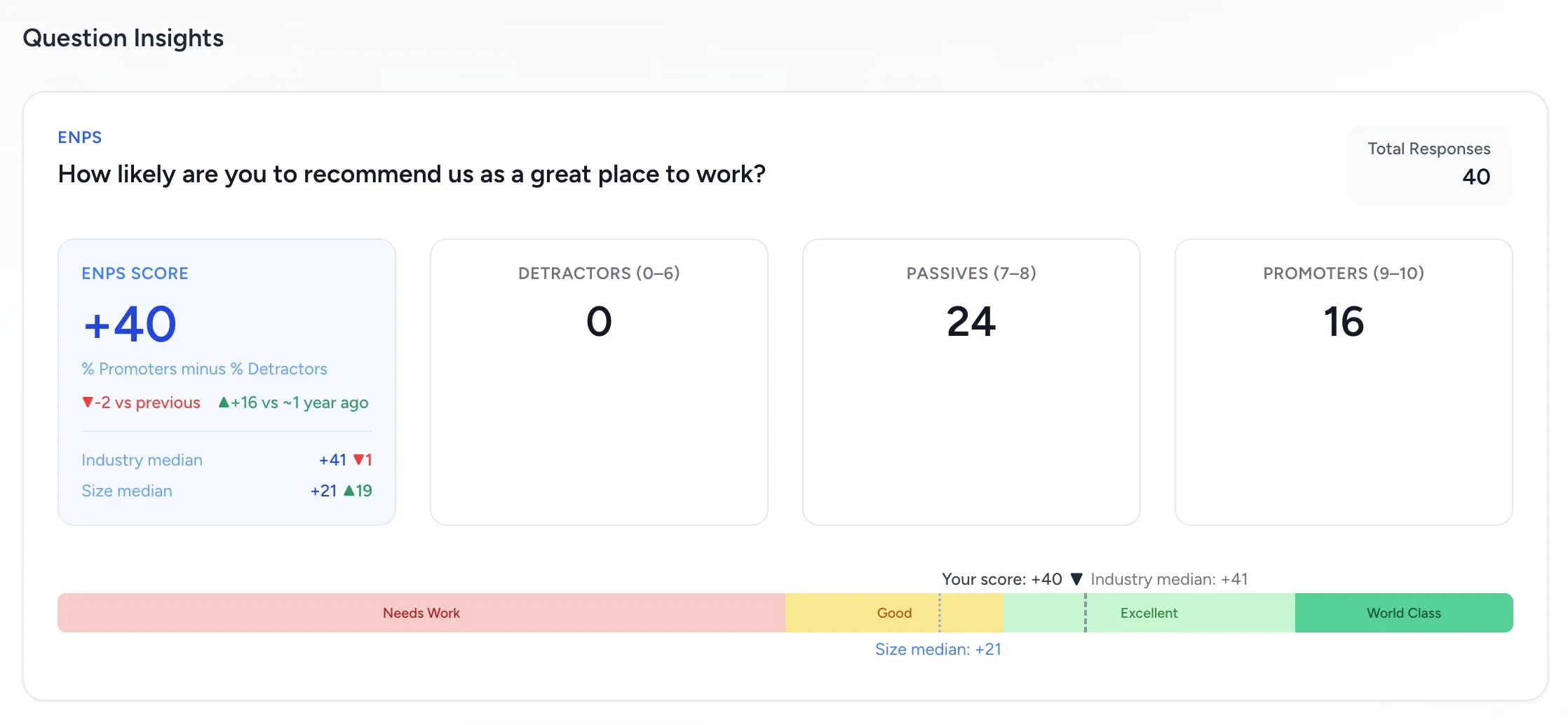
Survey question insights are designed to answer one question quickly: what changed, and where should HR act first? For eNPS questions, FeedbackPulse shows your score, benchmark context, and historical comparison markers in the same card.
Where to find survey results
Section titled “Where to find survey results”- Go to Surveys.
- Open a survey instance.
- Scroll to Survey Results for per-question insights.
For export and sharing workflows, admins can also use the survey report views under Reports.
What each question card shows
Section titled “What each question card shows”Every question card includes:
- The question text and type.
- Total Responses for that question.
- A question-type specific breakdown:
- Likert: average score and distribution.
- Yes/No: count and percentage split.
- Text: written responses (with anonymity protections).
- eNPS: score, promoter/passive/detractor split, benchmark context, and historical deltas.
How eNPS is calculated
Section titled “How eNPS is calculated”FeedbackPulse uses the standard eNPS model:
| Group | Rating range |
|---|---|
| Detractors | 0 to 6 |
| Passives | 7 to 8 |
| Promoters | 9 to 10 |
Formula:
$$ \text{eNPS} = %\text{Promoters} - %\text{Detractors} $$
This is why you can see negative scores as well as positive scores.
How to read the benchmark strip
Section titled “How to read the benchmark strip”For eNPS questions, the benchmark strip uses four zones:
| Zone | eNPS range |
|---|---|
| Needs Work | -100 to 0 |
| Good | 0 to 30 |
| Excellent | 30 to 70 |
| World Class | 70 to 100 |
The strip also shows reference markers:
- Your score marker (current survey).
- Industry median marker (or Global median if industry is not set).
- Size median marker when company-size benchmark data is available.
Industry and size medians
Section titled “Industry and size medians”Industry median
Section titled “Industry median”- If your company industry is set, FeedbackPulse uses that industry benchmark.
- If industry is not set (or maps to an unsupported benchmark), FeedbackPulse falls back to a global cross-industry median.
- Benchmark ranges are shown only when a low/high range is meaningful.
Size median
Section titled “Size median”Size median is mapped from company size bands:
1-10,11-50,51-200-> 0-250 band201-500-> 251-500 band500+-> 501-1000 band
If company size is not configured, FeedbackPulse infers the size band from active employee count.
Trend markers: vs previous and vs ~1 year ago
Section titled “Trend markers: vs previous and vs ~1 year ago”When comparison data exists, eNPS cards show two trend markers:
- vs previous
- vs ~1 year ago
Each marker shows:
▲+Nwhen the current score is higher▼Nwhen the current score is lower=when unchanged
If comparison data is unavailable, the UI shows:
no previous datano prior year data
How comparison surveys are selected
Section titled “How comparison surveys are selected”FeedbackPulse compares against surveys that match all of these rules:
- Same survey template.
- Same tenant.
- Status is
completedorexpired. - Not the current survey.
- Not a master recurring template survey.
Selection logic:
- Previous: most recent qualifying survey before the current launch date.
- ~1 year ago: qualifying survey with launch date closest to 12 months before the current launch date.
Privacy and filtering rules that affect results
Section titled “Privacy and filtering rules that affect results”- For anonymous surveys, results are hidden until the minimum anonymity threshold is met (3 completed responses).
- Department and employee-level filters recalculate visible aggregates based on the filtered audience.
- In shared reports, text responses can be withheld when anonymity thresholds are not met.
Practical interpretation workflow for HR managers
Section titled “Practical interpretation workflow for HR managers”- Start with Total Responses and response rate context.
- Check eNPS score and zone placement.
- Compare against industry/global and size medians.
- Read vs previous and vs ~1 year ago together before acting.
- Use text responses for explanation, but only after confirming sample size is reliable.
If you are reviewing recurring pulse surveys, this sequence helps separate real sentiment shifts from normal month-to-month variance.