








Free eNPS Calculator: Complete Guide (2026)

Naz Avo
Written by Naz Avo

AI & HR Solutions Specialist

Claudia Wild
Reviewed by Claudia Wild ·

Marketing Consultant, HR Software Specialist

How we evaluate

A Google setting

Free eNPS Calculator: Complete Guide (2026)

Employee Net Promoter Score (eNPS) is the simplest measure of how your employees really feel about working for you. One question. One number. One clear signal about the health of your workplace culture.

This guide covers everything you need to know about eNPS: from what it is and how to calculate it, to how to interpret your score and take action. Jump to the free eNPS calculator, or read the calculation and interpretation guidance first.


What Is eNPS?

eNPS is the employee-focused version of Net Promoter Score (NPS), a customer loyalty metric developed by Fred Reichheld and Bain & Company in the early 2000s. eNPS adapts that recommendation question to the workplace. Its score is a sentiment signal; the shared formula does not establish equally strong predictive power for employee retention. It is one of the core metrics in any employee engagement survey programme.

The eNPS question is:

"On a scale of 0 to 10, how likely are you to recommend [Company] as a place to work?"

Responses fall into three groups:

Group Score What it signals
Promoters 9 to 10 Enthusiastic advocates. They love working here and say so.
Passives 7 to 8 Satisfied but not passionate. Vulnerable to poaching.
Detractors 0 to 6 Unhappy employees. At risk of leaving and potentially disparaging the company.

The eNPS formula then calculates the net difference between your strongest advocates and your most disengaged employees.

eNPS vs Customer NPS

eNPS and NPS share the same question format and calculation method, but they measure fundamentally different things:

eNPS Customer NPS
Who answers Employees Customers
What it measures Workforce loyalty and engagement Customer satisfaction and brand advocacy
Benchmark context Use matched employee benchmark records Use customer/sector benchmarks; not interchangeable
Survey frequency Quarterly or monthly After transactions or annually
Action owner HR and leadership Customer success and product

High scores on both tend to correlate, and engaged employees deliver better customer experiences. But they are separate programmes with separate benchmarks; never compare your eNPS directly against a customer NPS figure.

Why Not Just Ask "Are You Happy?"

Happiness is fleeting and easy to fake in surveys. Willingness to recommend is a higher-stakes question: it reflects genuine belief. Promoter and detractor bands describe answers to the recommendation question. They do not establish what an individual employee will do next. eNPS forces employees to think about advocacy, not just momentary satisfaction.


How to Calculate eNPS

The eNPS formula is:

eNPS = % Promoters - % Detractors

Passives count in the total respondent denominator, but not in the promoter-minus-detractor numerator. Keep them in the total when calculating both percentages.

Worked Example

This calculation is illustrative, not customer data. Imagine 200 employees complete your eNPS survey:

  • 100 score 9 or 10 → Promoters = 50%
  • 60 score 7 or 8 → Passives = 30%
  • 40 score 0 to 6 → Detractors = 20%

eNPS = 50% - 20% = 30

The illustrative score is +30; whether that is strong depends on your context and reference point. The 30% of Passives didn't affect the score directly, but they represent a significant improvement opportunity.

Have a previous cycle to compare? Use the free eNPS interpretation workbook (XLSX) to calculate both scores and participation rates from aggregate counts, see how one answer can move the score, and record a next step. The eNPS workbook guide explains how to use it.


What Is a Good eNPS Score?

An eNPS above zero means promoters outnumber detractors. Labels such as good, excellent or world class are editorial guidance, not universal statistical cutoffs. Read the score alongside participation, comments, the closest benchmark and your own trend.

The January 2026 eNPS Tools compilation contains 554 published benchmark records. Its published global aggregate reports a median of +17 with n=5,000 organizations. This is one source-reported aggregate; it is not a pooled calculation across the 554 records or a count of FeedbackPulse survey responses. Country and industry records have different source cohorts and may overlap.

For the full picture, see our 2026 eNPS benchmarks by industry and region, or the versioned benchmark set at enpstools.com.


eNPS Limitations to Know

eNPS is powerful precisely because it is simple, but that simplicity comes with trade-offs worth understanding before you act on a score.

One number can hide segment problems. A company-wide eNPS of +35 can mask a department sitting at -15 and another at +60. Use team, tenure or role cuts only when disclosure controls and sample size allow them. The aggregate score is informative; segment-level data is where you can actually act.

Participation affects interpretation. A low response rate can hide views of nonrespondents, but the direction of that bias is not known from the rate alone. Report invitations, responses and participation, then investigate missing groups before interpreting movement.

Culture influences scoring differently across groups. In some organisations, cultural norms or hierarchical dynamics lead employees to avoid low scores regardless of actual sentiment. In high-mobility markets, even satisfied employees may score lower because they consider leaving normal. Context matters, so track your own trend over time rather than fixating on any single data point.

eNPS captures loyalty, not causes. A drop in score tells you something is wrong; it does not tell you what. Pair eNPS with at least one open-text follow-up question per respondent group, and complement it with a more diagnostic employee engagement survey annually.

Trust drives honesty. If employees suspect their responses can be traced back to them, even on platforms claiming anonymity, they will inflate scores. Select anonymous mode and verify access and small-group controls in your survey tool. Comments and context may identify someone even after names are removed.


Turn the score into a recorded action
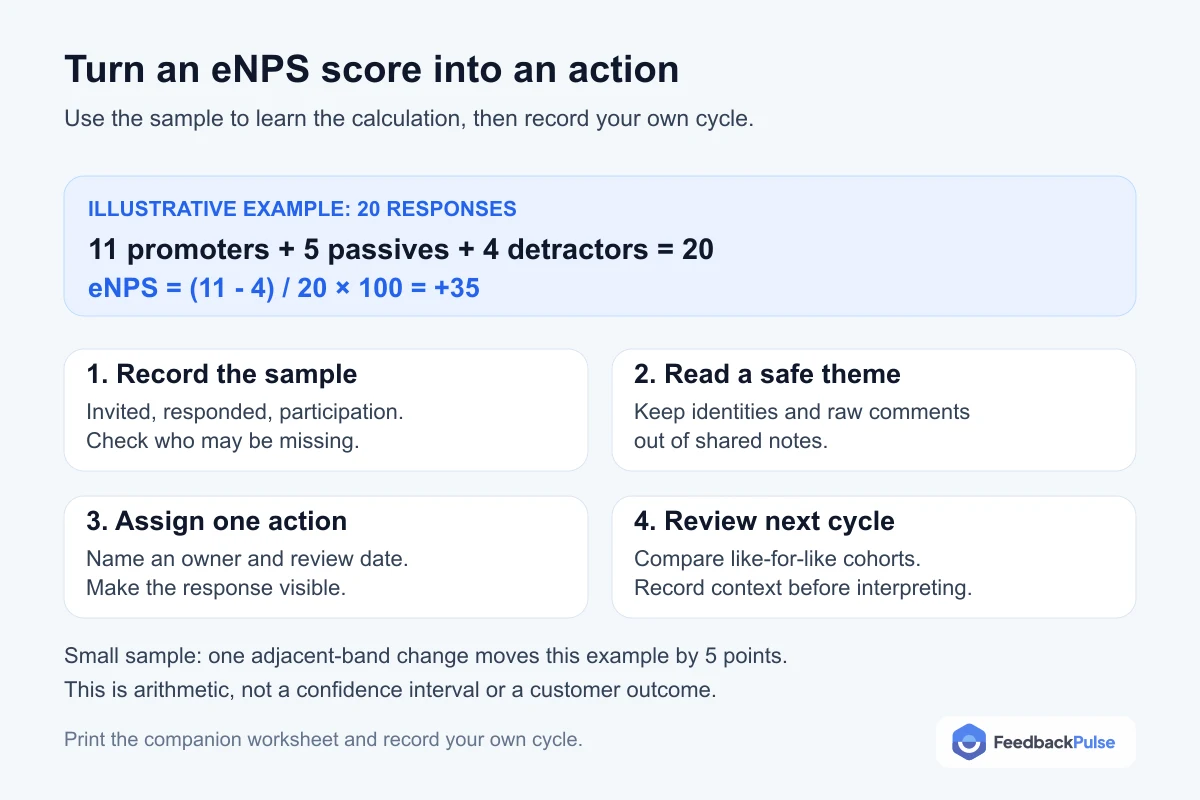
Illustrative eNPS calculation with 20 responses and a four-step worksheet for checking participation, choosing an action and reviewing the next cycle

In this illustrative sample, 11 promoters, 5 passives and 4 detractors make 20 responses. The score is (11 - 4) / 20 × 100 = +35. Moving one response between adjacent bands changes this small-cohort score by 5 points; from detractor to promoter changes it by 10. That is arithmetic, not a confidence interval or a customer outcome.

Open the printable eNPS-to-action worksheet. Record invitations, responses, participation, a safe theme summary, one action owner and a review date. Keep comments and identifying details out of the shared worksheet.

Free Interactive eNPS Calculator

Use the calculator below to enter your survey results and instantly get your eNPS score with a colour-coded interpretation and improvement tips.

Free eNPS calculator

Enter your survey responses below to instantly calculate your Employee Net Promoter Score.

eNPS = % Promoters − % Detractors  •  Score range: −100 to +100

Your eNPS Score

Total responses:

Promoters:

Detractors:

−100 0 +100

eNPS Range Rating What it means
−100 to −1 Critical More detractors than promoters. Review participation and comments.
0 to 9 Fair At zero the two groups are equal; above zero promoters outnumber detractors.
10 to 29 Good Promoters outnumber detractors. Compare with your own history.
30 to 49 Great Read alongside participation and the relevant benchmark.
50 to 69 Excellent A high score on this survey, not a verified employer ranking.
70 to 100 World-Class Check context and sample size before drawing conclusions.

These rating bands are editorial guidance. They don't establish statistical certainty or an employer ranking.

When is a calculator enough, and when do you need eNPS software?

For a one-off score, this calculator and a spreadsheet are enough. Software helps when collecting repeated surveys and controlling access takes more work than calculating the number.

Choose based on the work your team needs to manage.
Your needCalculator or spreadsheetWhat to compare in software
One scoreCalculator or spreadsheet: Calculate from response counts you already have.Compare in software: No purchase needed just for arithmetic.
Repeated surveysCalculator or spreadsheet: Keep the question, audience, and history consistent yourself.Compare in software: Scheduling and comparable history with participation counts.
Reporting privacyCalculator or spreadsheet: Restrict access to response rows and comments.Compare in software: Anonymous mode, viewer access, and small-group controls. Thresholds don't guarantee anonymity.
Team interpretationCalculator or spreadsheet: Prepare safe team summaries manually.Compare in software: Manager report scope and what happens below the response threshold.
Follow-throughCalculator or spreadsheet: Record an action, owner, and review date.Compare in software: Demonstrated action tracking, or a separate process your team will maintain.

Compare eNPS software criteria and package tradeoffs if you're still evaluating options.

Checking FeedbackPulse? Its results workflow and product screenshot show score calculation, qualifying prior-survey comparisons, and reporting-line access. Anonymous reports need three completed responses; comments and context can still reveal identities. Record your follow-up owner and review date separately.

For a small survey pilot, start free with FeedbackPulse: up to 10 people and five active plus scheduled surveys combined. Check pricing and plan details for larger teams or additional reporting needs.

How to interpret your score

Above zero, promoters outnumber detractors. There is no universal good-score threshold. Compare participation, comments, your own previous surveys, and a relevant published benchmark. A change in the number alone doesn't establish a change in the whole team's views.

Use the eNPS benchmark sources and cohort guidance to choose a relevant reference. Published records can use different samples and collection periods; they aren't a single pool of FeedbackPulse responses.

How to run an eNPS survey

The question

The standard eNPS question is:

"On a scale of 0 to 10, how likely are you to recommend [Company] as a place to work?"

Always include a follow-up open-text question:

  • For Promoters: "What do you love most about working here?"
  • For Passives: "What one thing would make this a better place to work?"
  • For Detractors: "What are the biggest challenges you face at work?"

This qualitative data is where the real insight lives.

Survey frequency

Most organisations run eNPS surveys quarterly. This cadence provides enough data to spot trends while giving leadership time to act before the next survey. High-growth or high-change environments may benefit from monthly pulses. Annual-only surveys miss too much.

Sample size and response rate

No single response count or participation rate guarantees precision. Report invitations and completed responses, consider who didn't respond, and treat small cohorts directionally. Privacy thresholds and statistical precision answer different questions.

  • Keep the survey short and explain how results will be used.
  • Send reminders within a reasonable response window.
  • Explain anonymous mode, viewer access, and small-group reporting limits.
  • Share a safe summary and the action you'll review next cycle.

eNPS vs traditional engagement surveys

eNPS Engagement Survey
Length1–3 questions20–60 questions
FrequencyMonthly or quarterlyAnnual or bi-annual
FocusLoyalty / advocacyMulti-dimensional engagement
OutputSingle score (−100 to +100)Dimension scores + themes
Best forQuick directional pulseDeep diagnostic analysis
Response timeUnder 1 minute10–20 minutes

eNPS and traditional surveys are complementary, not competing. Use eNPS as your always-on pulse and a longer engagement survey once or twice a year for depth.

How to improve your eNPS score

1. Close the feedback loop

Publish a safe "You said, we did" summary after each survey cycle. Name an action owner and review date, then explain what changed. This makes follow-through visible without promising a higher score.

2. Review detractor feedback

Detractors score 0 to 6 on the recommendation question. Read their comments for recurring themes such as workload or career progression. The response band alone does not predict whether an individual will leave.

3. Read passive feedback

Passives score 7 or 8. Read their comments rather than inferring their needs from the band. If 10% of all responses move from passive to promoter, the score rises by 10 points; this is arithmetic, not a predicted outcome.

4. Support managers

Use recurring feedback to identify where managers need support. Help them set clear expectations, give constructive feedback, and recognise good work. Tools like regular engagement surveys and structured performance reviews provide a framework for those conversations.

5. Explain privacy controls

Explain what is collected and who can see it. Verify anonymous survey controls before launch, and review comments and filters for identifying context. A reporting threshold alone cannot guarantee anonymity.

6. Learn from promoter feedback

Promoters are an under-used resource. Involve them in employee-resource groups, peer-mentoring, employer-brand content, and referral programmes. Engaged employees who feel valued deepen their commitment and pull others along with them.

7. Use safe team comparisons

A company-wide eNPS of +30 can mask a department at -10 and another at +60. Use team, tenure, location, or role cuts only when reporting controls and response counts allow them. Small groups and repeated comparisons can reveal identities.

Frequently asked questions

What is eNPS (Employee Net Promoter Score)?

Employee Net Promoter Score (eNPS) is a single-question metric that measures how likely employees are to recommend their company as a place to work, scored on a 0-10 scale. The final result ranges from -100 to +100.

What is a good eNPS score?

A score above zero means promoters outnumber detractors. There is no universal good-score threshold across organizations. Compare the relevant published benchmark, participation, comments and your own previous cycles; calculator labels are guidance, not statistical cutoffs.

What is the average eNPS score?

The January 2026 eNPS Tools compilation contains 554 published benchmark records. Its published global aggregate reports a median of +17 with n=5,000 organizations. That is one source-reported aggregate, not a pooled calculation across all records or FeedbackPulse survey responses. Compare the closest relevant segment and your own trend.

How do you calculate eNPS?

eNPS = (Number of Promoters / Total Respondents x 100) - (Number of Detractors / Total Respondents x 100). For example, if 100 employees respond and 50 are Promoters, 30 are Passives, and 20 are Detractors, the eNPS is (50% - 20%) = 30.

How often should you run an eNPS survey?

Quarterly is the most common cadence. It gives teams enough time to act on findings before the next survey. High-growth organisations sometimes survey monthly; annual surveys are generally too infrequent to catch issues early.

What sample size do I need for eNPS?

There is no single response count that guarantees a statistically meaningful eNPS. Report response count and participation, consider nonresponse and group composition, and treat small cohorts directionally. Reporting privacy thresholds and statistical precision are separate questions.

Should eNPS surveys be anonymous?

Anonymous collection can support candid feedback, but explain what is collected and who can see it. Select and verify anonymous mode, suppress small groups, and assess comments, filters and repeated comparisons for disclosure risk. No threshold alone guarantees anonymity.

Start hearing your team every month

Set up your first pulse survey today. Free for up to 10 people, and you can bring in reviews when you're ready.

No credit card required · Set up in minutes