









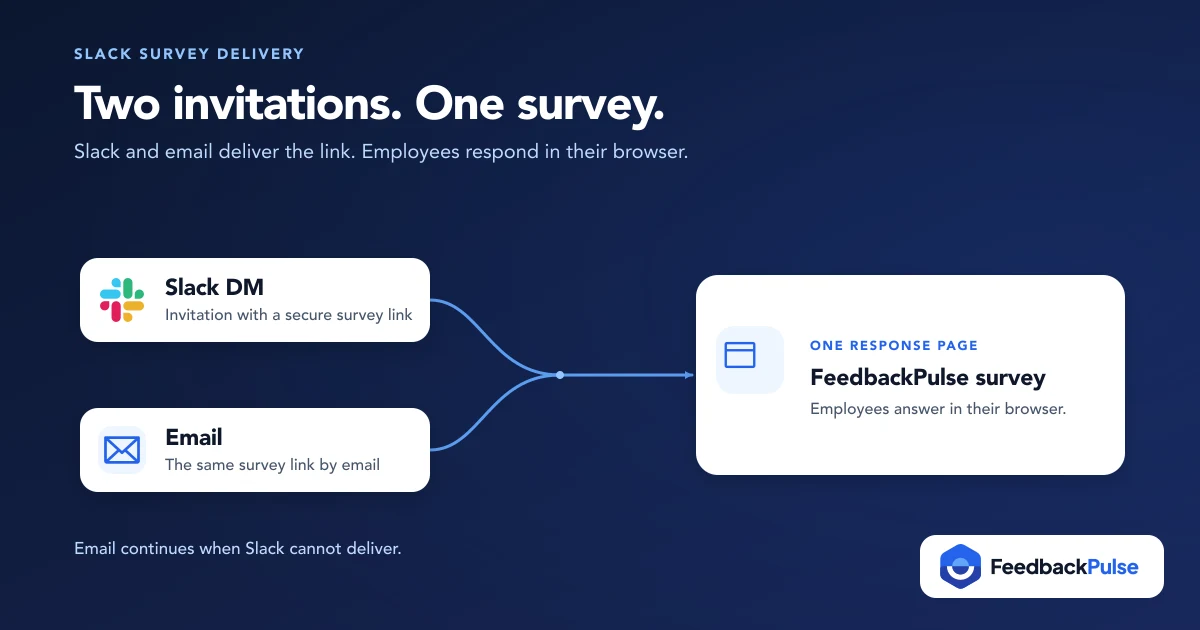
There are two real ways to send employee surveys in Slack: a quick native poll built right into a channel, or a connected survey platform that delivers a full survey as a Slack direct message with a link to a proper response page. Most teams searching for this mix the two up, and that mix-up is exactly what causes the trouble later. Here's how to tell them apart and set up the one that matches what you're actually trying to measure.
Quick fix if you're in a hurry: for a one-off, one-question vibe check, a native Slack poll works fine. For a recurring engagement survey, eNPS check, or anything you need to track over time, you want a connected survey tool that uses Slack as a delivery channel, not a replacement for a real survey instrument.
Key Takeaways
- Native Slack tools (polls, Workflow Builder forms) handle quick single-question checks but offer no anonymity controls, no trend tracking, and no eNPS scoring.
- Connected survey platforms treat Slack as a delivery channel: the direct message carries a secure link, and the actual survey opens in a browser, not inside the Slack window.
- In FeedbackPulse, Slack delivery is an Admin-gated connection matched by work email, with per-recipient status (Sent, Queued, Skipped, Failed) visible after launch.
- Email keeps sending as a fallback even when Slack is connected, so nobody gets missed because of a name mismatch.
- Slack delivery sits on FeedbackPulse's Max plan, alongside Microsoft Teams integration. It is not included in Free or Pro. See pricing.
Two Ways to Send Employee Surveys in Slack (and Why the Difference Matters)
Say you ask your ops lead to "just send the engagement survey through Slack." You might assume employees will tap a few buttons without leaving the app. What they get instead is a direct message with a link, and it can look like something is broken.
It isn't. That's how most connected survey platforms work, including FeedbackPulse, and once you know why, it stops looking like a limitation.
The distinction matters because each path solves a different problem:
- Native Slack tools (built-in polls, Workflow Builder forms, emoji-reaction checks) run entirely inside Slack. No separate login, no new tool, but also no real question types beyond simple choices, no anonymity protection, and no history to compare one month against the next.
- A connected survey platform uses Slack purely as a notification and delivery channel. The survey itself, with Likert scales, eNPS, open text, and branching logic, lives on a dedicated response page. Slack just makes sure employees notice it.
If you only remember one thing from this guide, make it this: "sent in Slack" almost never means "answered in Slack" once you move past a single yes/no poll. FeedbackPulse's engagement survey workflow follows the second model on purpose, and so do most serious survey tools once you check their actual documentation instead of their marketing page.
Option 1: Send a Quick Pulse Check With Native Slack Tools
Native Slack options are the right call when you want a single, low-stakes question answered fast and you don't need to keep any of the resulting data for later comparison.
What's available:
- Slack polls (via a poll app or a simple reaction-based message): post a question, employees react with an emoji, you read the tally.
- Slack Workflow Builder: build a short form that posts into a channel or collects responses through a form trigger, no coding required.
- Emoji-reaction check-ins: the lightest option of all, one message, a handful of emoji options, done in seconds.
Where native tools fall short for real survey programs:
- No anonymity controls. Reactions and form submissions are tied to a person by default.
- No trend line. Each poll is a one-off; nothing stitches this week's result to last month's.
- No eNPS scoring, no benchmark comparison, no department breakdowns.
- Limited question types. You're mostly choosing between a handful of reaction options, not building a real instrument.
For a once-a-quarter "how's everyone feeling about the office move" check, that's plenty. For anything you plan to repeat and track, it's a dead end. That's the gap a connected survey platform is built to close.
Option 2: Connect a Survey Platform to Slack for Real Engagement Surveys
A connected integration keeps the actual survey in a dedicated tool (with real question types, anonymity rules, and reporting) and uses Slack only to make sure people see it. In FeedbackPulse, that looks like this: an Admin connects the workspace once, and from then on, every survey launch can choose Email + Slack direct message as its delivery method, with email continuing to send for anyone Slack can't match.
That "can't match" part trips people up more than anything else. Say you connect Slack on a Tuesday and launch a pulse that afternoon. A few people may show Skipped next to their name in the recipients list.
That isn't a bug. Someone may have signed up for Slack with a personal email address, while FeedbackPulse has their work email on file. Ask them to update their Slack profile email and the next survey can match them, and email delivery covers them in the meantime regardless.
Want to see this delivery model in detail? The full setup walkthrough lives in the Slack integration help center guide, including screenshots of each settings screen.
How to Set Up Slack Survey Delivery in FeedbackPulse
Slack delivery is set up by an Admin from the integrations settings.
- Go to Settings > Integrations as a FeedbackPulse Admin.
- Find Slack survey messages and click Connect Slack, then review the requested permissions in the Slack screen that opens and click Allow.
- Turn on "Send Slack direct messages for new surveys" if you want this to be the default for new surveys (you can still change delivery for an individual survey before launch).
- Check delivery on the Review step the next time you launch a survey. It shows Email + Slack direct message, Email only, or Connect first if Slack isn't connected yet.
- Check the recipients list after launch to see per-recipient Slack delivery status.
If you don't see Slack in Settings > Integrations, Slack survey messages may not be enabled for your organisation yet. Contact [email protected].
Here's what those statuses mean once a survey goes out:
| Status | What it means |
|---|---|
| Sent | The Slack direct message delivered successfully |
| Queued | FeedbackPulse is still preparing to send it |
| Skipped | Slack wasn't attempted, usually because the employee's Slack email doesn't match their FeedbackPulse email |
| Failed | Slack returned an error; email delivery continues on its own track regardless |
Note that Slack integration (along with Microsoft Teams) sits on FeedbackPulse's Max plan. It isn't part of the Free or Pro tiers.
Want Slack delivery on your next survey? Compare plans to see what Max includes before you plan a rollout around it.
Does Sending Surveys in Slack Protect Anonymity?
Sending a survey as a Slack direct message is private between FeedbackPulse and that one employee, so the delivery mechanism itself doesn't create a public record the way posting in a channel would. But the question people actually mean to ask is different: does the survey stay anonymous once it's answered? That's a function of the survey tool's reporting rules, not the channel it arrived through.
In FeedbackPulse, anonymous survey results stay withheld until a minimum number of responses lands for any given group, whether that's the whole company or a single department slice. A Slack-delivered survey and an email-only survey follow the identical rule. For the mechanics and exact thresholds, see survey anonymity thresholds and the anonymous surveys feature. The honest caveat applies either way: a reporting threshold reduces disclosure risk, it doesn't guarantee anonymity in every edge case, especially in very small teams or when open-text comments reveal identity on their own.
Does Slack Delivery Actually Improve Response Rates?
Slack delivery doesn't replace good survey hygiene, it adds a second high-visibility channel on top of it. Employees who check Slack constantly during the workday but let email pile up now see the survey link somewhere they're already looking. Employees who aren't active in Slack, or whose email doesn't match, still get the email invitation exactly as before. Nobody is worse off, and some people are meaningfully better reached.
The response-rate basics still do the heavy lifting regardless of channel: keep the survey short (five to ten questions for a pulse), give a clear close date, and have managers actually reference results afterward so people believe answering was worth the two minutes it took. See how often you should run pulse surveys for cadence guidance that pairs well with Slack delivery specifically, since a channel people check daily can tolerate a tighter survey rhythm than one that relies on email alone.
Choosing the Right Approach for Your Team
Picture a team lead who starts with a weekly emoji-reaction check-in posted to the team channel: fast, free, and fine for a quick gut check on workload. When they want to track eNPS and compare sentiment month over month, the reaction poll has nothing to build on. The sensible move is to run the recurring program on a connected platform with Slack DM delivery and keep channel reactions for the occasional one-off question.
Use this quick comparison to decide which path fits what you're doing right now:
| Your situation | Use this |
|---|---|
| One-off, single-question vibe check | Native Slack poll or reaction |
| Need to track sentiment over weeks or months | Connected survey platform with Slack delivery |
| Need eNPS, anonymity thresholds, or department breakdowns | Connected survey platform with Slack delivery |
| Team already lives in Slack all day | Either, but pair a connected platform with Slack delivery for better reach |
| Budget-constrained, no dedicated survey tool yet | Start native, upgrade to a connected tool once cadence becomes real |
For a broader look at tools built specifically for recurring pulse programs, compare the best pulse survey tools before you commit to one.
Getting Started
Pick the method that matches what you're measuring, not just what's fastest to set up this afternoon. A native Slack poll is the right tool for a single quick question. A connected survey platform with Slack DM delivery is the right tool the moment you want a real, trackable engagement or eNPS program, anonymity protections included.
If that second case is you, compare plans to add Slack delivery on Max, connect Slack from Settings > Integrations, and choose Email + Slack direct message the next time you launch a survey. Email keeps working for anyone Slack can't reach.
Frequently asked questions
Can employees answer a FeedbackPulse survey directly inside Slack?
No. The Slack direct message includes a secure link, and employees complete the survey on FeedbackPulse's response page in their browser. Email continues to work as a parallel delivery channel for everyone.
Do I need a paid Slack plan to connect FeedbackPulse?
You need permission to install apps in your Slack workspace. On the FeedbackPulse side, Slack delivery is part of the Max plan, not Free or Pro.
Why didn't some employees get a Slack message?
The most common reason is a mismatch between the email address on their Slack profile and the one FeedbackPulse has on file. They still receive the survey by email, and updating the Slack profile email fixes it going forward.
Can I turn Slack delivery off for just one survey?
Yes. On the Review step before launch, click Change in the Delivery section and turn off Slack direct messages for that survey.
Is a Slack-delivered survey less anonymous than an email one?
No. Anonymity depends on the survey tool's reporting threshold (the minimum group size before results are shown), not the delivery channel. Slack and email use identical anonymity rules in FeedbackPulse.
Who can connect Slack to FeedbackPulse?
A FeedbackPulse Admin starts the connection. Your Slack workspace may also require approval from a Slack workspace owner or admin.