



Most employee surveys are built on an assumption that breaks on the shop floor: that everyone has a work inbox they check. Machine operators, warehouse pickers, nurses, kitchen staff, drivers and store associates often don't. So the survey goes to the people at desks, the results describe the people at desks, and the decisions that follow are made for the people at desks.
FeedbackPulse fixes the access problem without asking frontline teams to install anything. You publish one link and QR code per survey. An employee opens it on their phone or on a shared tablet, types their Employee ID, and answers in a few minutes. The ID makes sure each person answers once. The results are reported anonymously, next to everything else you survey.
Key Takeaways
- One reusable link and QR code per survey, for phones, shared tablets, and break-room PCs.
- Employees check in with their Employee ID. No app, no account, no work email.
- Each ID can respond once, and only the employees you selected can check in.
- Shared tablets clear answers between people and reset after five idle minutes.
- Results use the same anonymity threshold and reports as every other FeedbackPulse survey.
How it works on a site
1. Import your roster. Upload a CSV with a name and Employee ID for each person, plus department or location if you want to split results by them. Email is optional, so the people who never had one are no longer a special case.
2. Choose Shared link and select who can answer. When you build the survey, pick Shared link as the delivery method and select the employees who should take part. Only those IDs can check in.
3. Launch and put the QR code where people already stop. Download the branded QR code and print it for the time clock, the break room, the locker area, or the back of a payslip. Set a tablet on a stand by the canteen if you want a fixed spot. The same code works on every device.
4. Read the results with everyone else's. Responses arrive in your normal survey reports, with the same anonymity threshold and the same exports. Nothing to reconcile from a separate tool.
What frontline teams get
One QR code, no app and no accounts
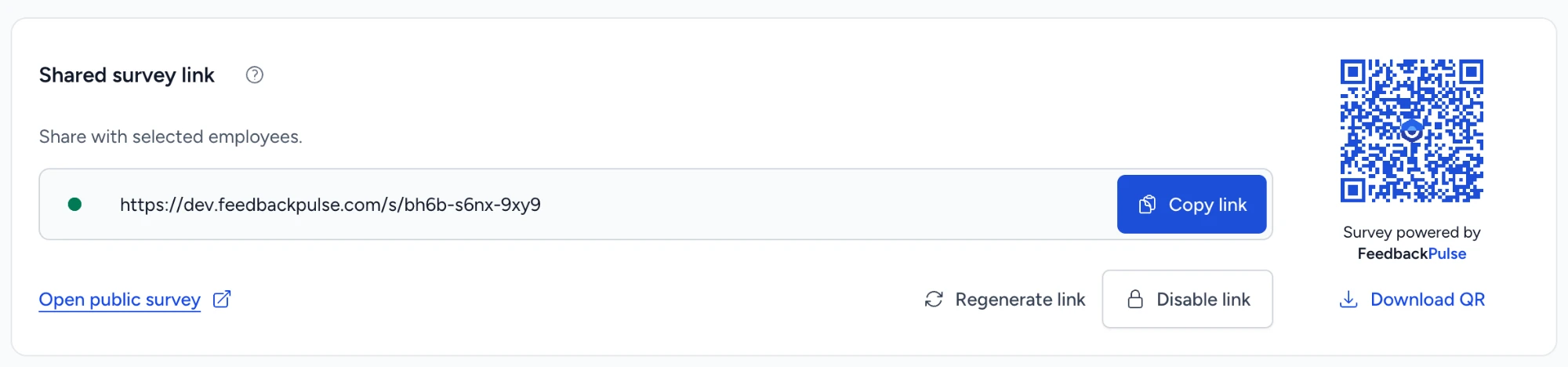
Each survey gets a single short link and a branded QR code. There is nothing to download from an app store and no password to forget between shifts. People answer in whatever browser is in front of them, which matters when half the team is on personal phones and the other half shares a tablet. See how QR code and kiosk surveys work for every screen.
Employee ID check-in, one response per person
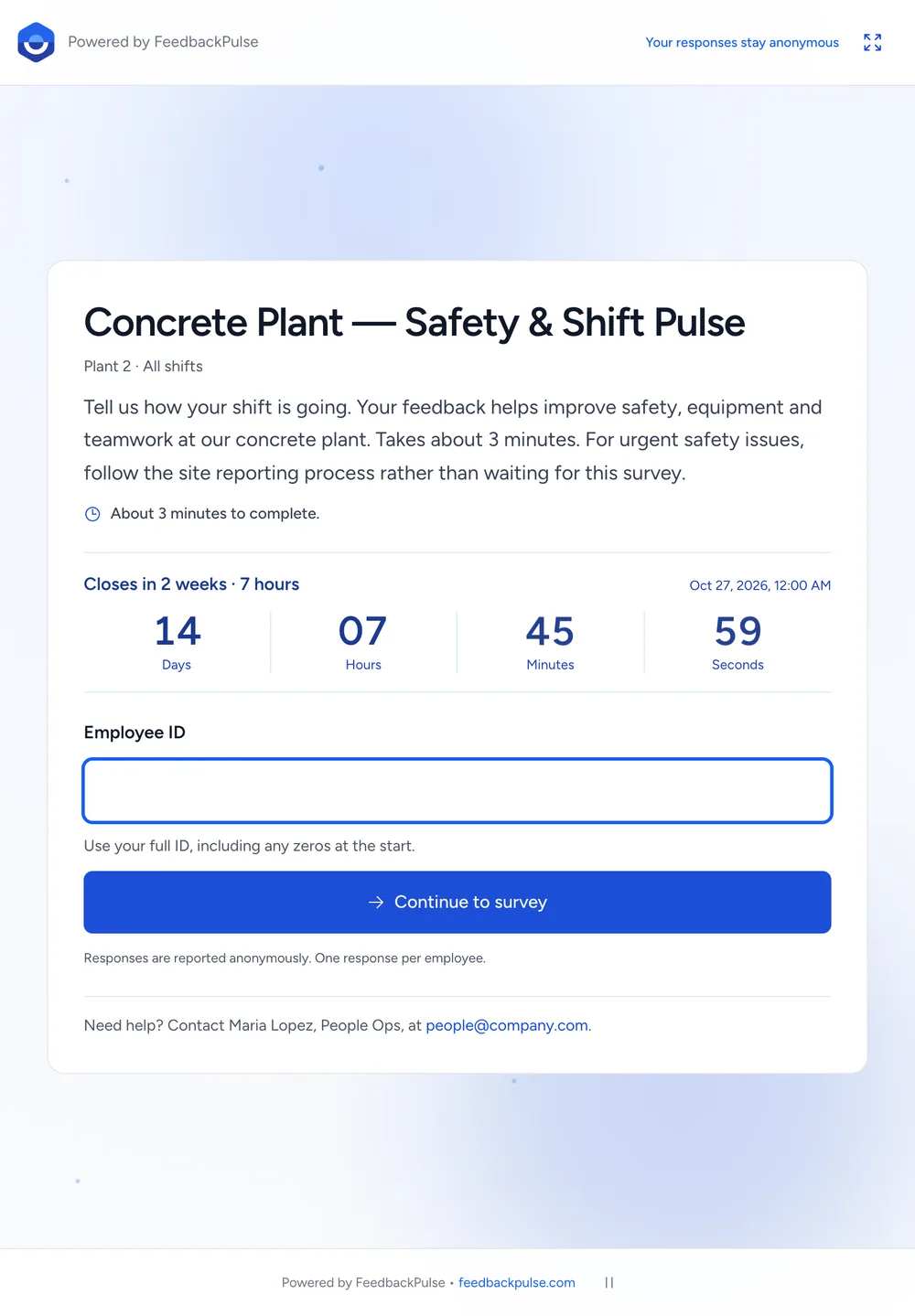
An open link with no check-in invites duplicate answers and responses from people outside the team. FeedbackPulse asks for the Employee ID first and matches it exactly, leading zeros included. Unknown or out-of-scope IDs get a neutral refusal that reveals nothing about who is on the roster. Each ID submits once, and the first committed answer wins even if two devices try at the same moment.
A shared tablet that resets itself
When a survey runs on a shared device, the risk is the next person seeing the last person's answers. After each submission the screen clears the ID and the answers before it shows the thank-you, then returns to check-in after five seconds or when someone taps Next employee. Start over discards an answer in progress. Five minutes without activity clears it too, with a 30-second warning first. Refresh, Back, and a second browser tab can't restore what was cleared.
Anonymous results that hold on small shift teams
The Employee ID controls access. It does not put a name next to an answer in your reports. Anonymous results stay hidden until at least three people have responded, and department and location breakdowns come from the roster fields you imported. If you run engagement surveys or eNPS for office staff, frontline answers sit in the same place, measured the same way, with eNPS benchmarks for context.
You stay in control of the link
Copy the link, open the public survey, regenerate it, or disable it from the survey's results page. Regenerating retires the old URL and QR code immediately, which is useful when a poster ends up somewhere it shouldn't. The check-in screen shows the closing date and time, a live countdown in the final three days, and the name of the survey administrator to contact for help.
Where it fits
Manufacturing and plants. A tablet by the time clock catches people at the start or end of a shift, when they are not on the line. Keep the survey to safety, equipment, and supervisor support, and say plainly in the introduction that urgent safety issues go through the site reporting process, not the survey.
Warehouses and logistics. Pickers and drivers rarely sit at a computer but almost always carry a phone. A QR code on the dock door or in the driver room gets more answers than an email they will never see.
Retail and restaurants. Store and kitchen teams change often and work split shifts. A QR code on the staff noticeboard, mentioned once in the pre-shift huddle, reaches part-timers who are never on the email list.
Healthcare and care homes. Nurses and care staff move between wards and have little time at a desk. A short pulse on a ward tablet or a personal phone fits into a break, and the anonymity threshold matters on small units.
Field and multi-site teams. Crews that only pass through a depot can scan a code on the way out. Location fields on the roster let you compare sites without exposing small crews.
Questions that work on the floor
A frontline employee survey gets honest answers when it is short and concrete. Five to eight questions is plenty for a shift break. Ask about things the site can actually change:
- I have the tools and equipment I need to do my job safely.
- My shift schedule gives me enough notice to plan my life.
- My supervisor treats people on my shift fairly.
- When I raise a problem, something happens.
- How likely are you to recommend working here to a friend? (eNPS)
- What is one thing that would make your next shift better?
Then close the loop where people will see it: on the same noticeboard where the QR code was. A short "you said, we did" note is the best way to lift response rates next time.
Honest scope, on purpose
Frontline rollouts fail on details, so here are ours.
- Employee ID is the only check-in. There is no second PIN or passcode. That keeps check-in fast at a busy time clock, but someone who knows a coworker's ID could answer as them. One response per ID limits the damage, and the real employee will see Already completed.
- Shared links are for one-off surveys. Recurring survey programs still use personal invitations. For a quarterly frontline pulse, launch each round as its own survey.
- No invitations or reminders. A shared-link survey sends nothing by email, Slack, or Teams. Posters, huddles, and supervisors do the reminding.
- It needs a connection. Answers are submitted live in the browser. There is no offline mode for sites without Wi-Fi or mobile signal.
- Device lockdown is yours. The survey can run fullscreen and resets itself, but locking a tablet to a single app is set in the device's own settings, such as Guided Access on iPad.
- Everyone counts as a seat. Employees on the roster count toward your plan the same way office staff do. See pricing.
Start with one site
Pick one site or one shift, import its roster, and put a QR code up for a week. The free plan covers up to 10 people, enough to test the full check-in and tablet reset before you roll it out. If you are planning a survey for a few hundred people, book a demo and we'll walk through the roster import with you.
Frequently asked questions
How do frontline employees without a company email take the survey?
You share one link or QR code for the survey. Employees open it on their own phone, a shared tablet, or a break-room computer, type their Employee ID, and answer in the browser. Nobody needs an account, an app, or an email address. Your roster only needs a name and an Employee ID for each person.
Is a QR code employee survey still anonymous if people enter an Employee ID?
The Employee ID controls who can answer and stops the same person answering twice. Results are reported under the survey's anonymity setting, and anonymous results stay hidden until at least three people have responded. Comments and very small groups can still reveal someone, so keep filters broad on small shift teams.
Can several employees use the same tablet?
Yes. After each submission the screen clears the Employee ID and answers, shows a short thank-you, and returns to check-in after five seconds or as soon as someone taps Next employee. An unfinished response is discarded after five minutes without activity, and refreshing or pressing Back cannot bring the previous person's answers back.
Can someone answer more than once or for a coworker?
Each Employee ID can submit once. A second attempt shows Already completed without revealing any answers. Check-in uses the Employee ID alone, so someone who knows a coworker's ID could use it. If that happens, the real employee sees Already completed and can contact the survey administrator named on the screen.
Do we have to import email addresses?
No. Import a CSV with each person's name and Employee ID, and leave email blank for anyone who does not have one. Leading zeros are kept, and duplicate IDs are rejected instead of being merged. People without an email never receive email from FeedbackPulse.
Does a shared-link survey send invitations or reminders?
No. A shared-link survey sends no email, Slack, or Teams invitations or reminders, so distribution is in your hands: posters by the time clock, a tablet in the break room, a mention in the shift huddle. The check-in screen shows the closing date and a countdown in the final three days.
What happens if a QR code poster gets photographed or shared outside the site?
Only employees you selected for the survey can check in, and unknown IDs get the same neutral refusal. If you want to retire a link, regenerate it: the old URL and QR code stop working immediately, and you can print the new code. You can also disable the link and switch it back on later.
What does it cost to survey a frontline workforce?
Everyone on the roster counts as a seat, the same as office staff. The free plan covers up to 10 people, which is enough to test the full check-in flow on a tablet. Larger sites use per-employee paid plans with no setup fee, listed on the pricing page.