









The best survey reminder email template is short, states the deadline, repeats how long the survey takes, and links to the survey once. If the survey is anonymous, it also restates how anonymity works, in one sentence, so people trust the link. Below you'll find copy-paste templates for the whole sequence: the leadership announcement, the invitation, two reminders, a last chance survey reminder, the thank-you, and the results share.
A survey reminder email is a brief follow-up sent while a survey is still open, restating the link, the time it takes and the deadline so the invited group has a second look at the request.
Most teams write one invitation, send it on a Monday, and hope. Rahul Iyer, operations lead at a 60-person logistics company, did exactly that. By day six the survey had sat unread under a pile of dispatch emails, and he had no reminder ready. He wrote one in a rush, and the tone came out sharper than he intended. The templates below are the ones he should have had on hand. For the questions themselves, start from our employee survey template pack.
Key Takeaways
- A complete survey email sequence has seven parts: leadership announcement, invitation, reminder 1, reminder 2, final call, close and thank-you, and a results share.
- Every invitation needs three facts: how anonymity works, how long the survey takes, and the exact deadline.
- Two reminders and one final call is a sensible default for a survey that is open one to two weeks. Stop after three nudges.
- On an anonymous survey, never imply you know who hasn't answered. Send reminders to everyone and thank people who already responded.
- Frontline teams without email need a QR code or shared link, plus in-person reminders at huddles.
The survey email sequence at a glance
Each message has one job. Keep the job narrow and the email stays short.
| Message | When to send | One job | Length |
|---|---|---|---|
| Leadership announcement | 1 to 3 days before launch | Explain why you're asking | 120 to 150 words |
| Invitation | Launch day | Get the first click | 80 to 120 words |
| Reminder 1 | About 40% of the way through the window | Restate the link and deadline | 40 to 70 words |
| Reminder 2 | About 70% of the way through | Show why it matters, with a past action | 50 to 80 words |
| Last chance | Final day, morning | Name the exact close time | 30 to 50 words |
| Close and thank-you | Right after close | Thank people, say when results arrive | 60 to 90 words |
| Results share | Within two to three weeks | Show what you heard and what changes | 150 to 200 words |
Fill the square brackets with your own details. Where a template says [survey link], paste your survey's URL or button.
What every survey email needs before you send it
Three facts belong in every invitation, and the first reminder should repeat them.
- The anonymity mechanism. Don't just write the word anonymous. State the rule. In FeedbackPulse, results stay locked until at least 3 people have responded, and every team, department or location slice stays masked until that group has 3 responses of its own. Our guide to survey anonymity thresholds explains why that matters. If you use another tool, replace the sentence with that tool's real rule.
- Time to complete. A specific number beats "a few minutes." Say "about 4 minutes" and make it true.
- The deadline. Include the day, the date and the time, in the reader's time zone if you span several.
Also keep one link per email. A second link gives people a reason to wander off.
Employee survey invitation email templates
These two templates open the sequence. The leadership note builds context. The invitation asks for the click.
Template 1: Leadership launch announcement (survey announcement email)
Send this from a founder, CEO or COO one to three days before the survey opens. It works as an email, an all-hands script or a post in your main chat channel.
Subject: A short survey is coming on [day]. Here's why we're asking.
Hi team,
On [day], you'll get a short survey about [topic: how work is going, workload, and how supported you feel]. I want to explain why before it lands in your inbox.
We're running it because [one honest sentence about the real reason]. I don't want to guess how this feels from the inside.
Here's what to expect:
- It takes about [4] minutes.
- It's anonymous. Results stay hidden until at least 3 people have responded, and no team or location breakdown appears until that group has 3 responses of its own.
- It closes on [day, date, time].
- By [date], I'll share what we heard and what we're changing, including anything we decide not to do yet.
Thank you for being straight with us.
[Name, title]
Other subject lines to try: "What we'll do with your survey answers" or "Before the survey: three things I'm promising."
Template 2: Survey invitation (engagement survey email)
Send this on launch day, mid-morning, from a named person rather than a no-reply address.
Subject: [4 minutes] Our [month] survey is open until [day]
Hi [first name],
The [survey name] is open. It takes about [4] minutes and closes on [day, date, time].
[Take the survey: survey link]
Before you start:
- Your answers are anonymous. Results stay hidden until at least 3 people have responded, and team or location breakdowns stay hidden until that group has at least 3 responses.
- You can answer on your phone or your laptop.
- Last time you told us [theme]. Since then we [action]. This survey tells us whether it worked.
Thanks,
[Name]
If your survey isn't anonymous, say so plainly instead: "Your answers are linked to your name, and only [role] can see them." People forgive a named survey. They don't forgive one that pretends to be anonymous.
Survey reminder email template: reminder 1, reminder 2 and final call
This is the core of the sequence. The timing column in the table above keeps spacing sensible: roughly 40% and 70% of the way through the window, then a final call.
Template 3: Reminder 1 (the survey reminder email template to use first)
Subject: Quick reminder: [survey name] closes [day]
Hi [first name],
A quick reminder that the [survey name] is open until [day, date, time]. It takes about [4] minutes.
[Take the survey: survey link]
The survey is anonymous, so we can't tell who has finished, and this note goes to everyone invited. If you've already answered, thank you, and please ignore this message.
[Name]
Adjust the middle paragraph to match how your reminders are actually sent. Optionally add one line with the overall response rate so far, such as "about half the company has responded." A rate is fine to share. A list of names never is.
Template 4: Reminder 2
Change the angle here. Reminder 1 restated logistics. Reminder 2 explains why the answers matter, using one real example of past action.
Subject: Last time you said [theme]. Here's what changed.
Hi [first name],
After the last survey, you told us [theme]. We responded by [specific action]. This survey is how we find out whether it worked, and what to fix next.
It takes about [4] minutes and closes on [day, date, time]. [Take the survey: survey link]
If you've already answered, thank you. Your answers are anonymous, and results stay hidden until at least 3 people have responded.
[Name]
Template 5: Final call (last chance survey reminder)
Send this the morning of the last day. Keep it calm. A threatening tone costs you honest answers.
Subject: Closing today at [time]: [survey name], [4] minutes
Hi [first name],
The [survey name] closes today at [time]. It takes about [4] minutes, and it's anonymous.
[Take the survey: survey link]
If you've already answered, thank you, and you're all set.
[Name]
Other subject lines for the three reminders:
| Reminder | Alternative subject lines |
|---|---|
| Reminder 1 | "Your [month] survey is still open" or "[4] minutes before [day]: your feedback on [topic]" |
| Reminder 2 | "Here's what your last answers changed" or "How we used your feedback, and what's next" |
| Final call | "Last chance: survey closes at [time]" or "Final call for the [survey name]" |
Close and results share templates
The close and the results share are where trust is built or lost. Skipping them is the most common reason participation falls the next cycle.
Template 6: Close and thank-you
Subject: Thank you. The [survey name] is closed.
Hi team,
The [survey name] closed [yesterday] and [response rate] of us took part. Thank you.
Results are being reviewed now. By [date], I'll share what we heard and the actions we're taking.
[Name]
Template 7: Results share (you said, we did)
Send this within two to three weeks of closing. It is the email that makes the next survey worth answering. For the thinking behind the action list, see our guide to acting on pulse survey results.
Subject: What you told us, and what we're doing about it
Hi team,
Thank you for the honest answers. Here's the short version.
You said:
- [Theme one, in plain words]
- [Theme two]
- [Theme three]
We're doing:
- [Action for theme one, owner, date]
- [Action for theme two, owner, date]
We're not doing yet, and why:
- [Theme three: the honest reason]
We'll check back on these in [month], when the next survey opens.
[Name]
Note the "not doing yet" line. Naming what you won't change is more credible than a list in which everything is "in progress."
Short email variants for pulse, eNPS and exit surveys
Recurring and one-question surveys need shorter emails. People who see the same survey every few weeks don't need an explanation each time. Our pulse surveys guide covers cadence in detail.
Pulse survey invitation and reminder
Subject: [Month] pulse: 2 minutes
Hi [first name], this month's pulse is open until [day]. It's [5] questions and takes about 2 minutes. Anonymous, with results hidden until at least 3 people respond. [Survey link]
Reminder subject: Pulse closes [day]
Quick reminder: this month's pulse closes [day, time]. About 2 minutes. [Survey link] If you've already answered, thank you.
eNPS survey invitation and reminder
Subject: One question about working here
Hi [first name], we ask one question each [quarter] to see how we're doing: how likely are you to recommend [company] as a place to work? It takes under a minute and closes [day]. Anonymous, with results hidden until at least 3 people respond. [Survey link]
Reminder subject: Still open: the one-question survey
A reminder that the one-question survey closes [day, time]. Under a minute. [Survey link] Thanks if you've already answered.
Exit survey invitation and reminder
Exit surveys are usually confidential rather than anonymous, because you know who is leaving. Say exactly who sees the answers. Our exit survey questions page has the question set to pair with this.
Subject: Would you share a few thoughts before you go?
Hi [first name], thank you for your work with us. Before [last day], we'd value your honest view on what worked and what didn't. It takes about [5] minutes and is optional. Only [role] will see your answers, and we'll share themes, never individual comments, with managers. [Survey link]
Reminder subject: A last chance to share feedback
A reminder that the exit survey stays open until [date]. It's optional, and your answers go only to [role]. [Survey link] Whatever you decide, thank you, and we wish you well.
Slack and Teams survey reminder message
Chat suits a nudge better than an email does. It's short, and people see it in the place they already work. Here is a message you can copy into a channel on any plan.
Quick note for #[channel]: the [survey name] closes [day] at [time]. It takes about [3] minutes and it's anonymous, with results hidden until at least 3 people have responded. Link: [survey link]. If you've already done it, thank you.
A day-of version needs even less:
Last call: [survey name] closes at [time] today. [3] minutes, anonymous. [Survey link]
This is copy to paste by hand. FeedbackPulse's Slack and Microsoft Teams integrations are Max-plan features, so don't assume they're part of the Free or Pro plans. Post in a shared channel, not a direct message to individuals, and never tag people who haven't responded.
Reminder template for frontline teams with no email
A shared link or QR code sends no emails, so the reminder becomes a notice and a conversation. Mateus Oliveira, who runs operations across four retail stores, printed a QR poster for each break room and read three sentences aloud at each shift huddle in the final week. Nothing on the poster named a person. Our guide on how to survey employees without email covers the full rollout.
Poster copy:
Tell us how work is going.
Scan the code, enter your Employee ID, and answer [6] questions in about [3] minutes. Open until [date].
Your ID gets you in and stops double answers. Results are reported without names and stay hidden until at least 3 people have responded.
Shift huddle script (about 20 seconds):
The staff survey closes on [day]. It takes about 3 minutes, and you can do it now on the tablet by the time clock or later on your phone. Scan the code on the poster. Your manager can't see what you said, and nobody sees results for a group smaller than 3. Thanks to everyone who's already done it.
Ask supervisors to give people a few minutes on the clock. Paid time to answer is the biggest lever for frontline participation.
How many survey reminders to send, and when
Two reminders plus a final call is a sensible default. For a survey open one to two weeks, that adds up to the invitation, three nudges, and the close. More than that, and the nudges start to feel like pressure.
| Survey window | Invitation | Reminder 1 | Reminder 2 | Final call |
|---|---|---|---|---|
| 3 to 5 days (pulse) | Day 1 | Day 3 | Skip | Last morning |
| 7 days | Day 1 | Day 3 | Day 5 | Day 7 morning |
| 14 days | Day 1 | Day 5 | Day 10 | Day 14 morning |
| 3 to 4 weeks (frontline, rotating shifts) | Day 1 | Week 1 | Week 2 | Last 2 days |

Best time to send a survey reminder
Mid-morning on Tuesday, Wednesday or Thursday, in each person's local time, is a sound starting point. Monday mornings are crowded and Friday afternoons are mentally closed. For shift workers, announce at the start of the shift. Treat this as a default to test, and compare your participation rate across cycles. Our participation rate guide explains why no single outside number tells you whether your own rate is healthy.
Automate the repeatable parts
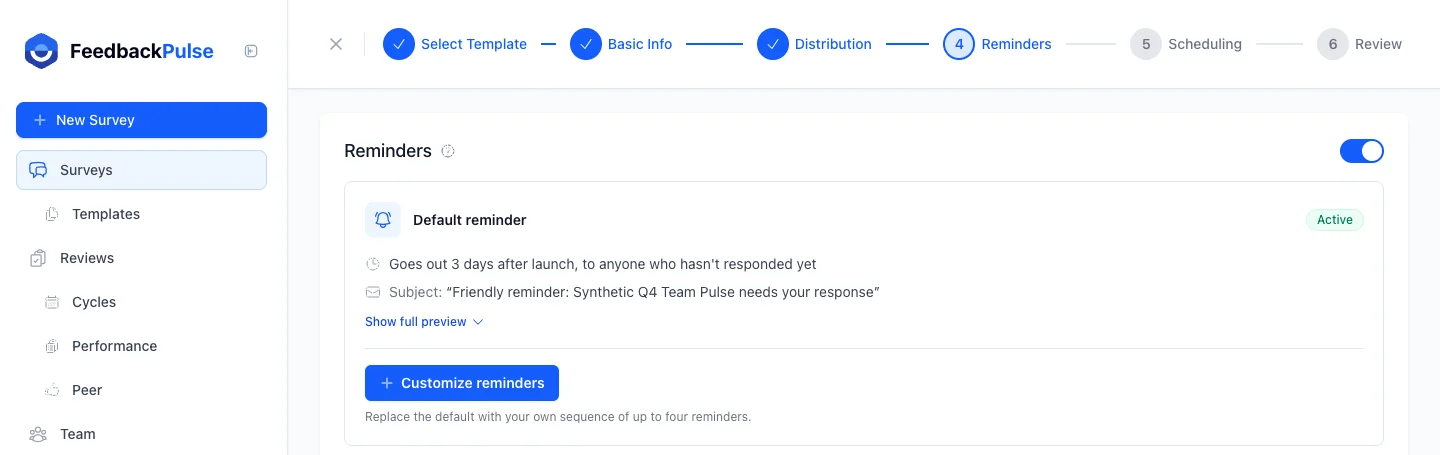
The leadership note and the results share need a human voice. The schedule doesn't. FeedbackPulse's Automated Scheduling covers recurring survey timing with reminders, so you aren't rebuilding the same sequence by hand each cycle. You can read more on the engagement surveys feature page.
What not to say in a survey reminder
The fastest way to wreck a reminder is to imply you know who hasn't answered. On an anonymous survey, that is a trust killer.
Siobhan Murphy, HR lead at a 140-person fintech, wrote this line in a reminder: "We can see who hasn't responded yet." She meant it as a gentle nudge. By the next morning, people were asking in chat whether the survey was really anonymous. She had to send a correction explaining that only the overall rate was visible. The damage to the next cycle's participation took much longer to repair.
Avoid these phrases and patterns:
| Don't write | Why it backfires | Write this instead |
|---|---|---|
| "We can see who hasn't responded." | Contradicts anonymity | "This goes to everyone invited. If you've answered, thank you." |
| "Only 12 people from your team have answered." | Small group sizes hint at identity | "Overall, about half the company has responded." |
| "Managers will be following up with non-respondents." | Turns a survey into a compliance check | Have managers mention the survey in a normal team meeting |
| "Please respond ASAP, it's important!" | Pressure language reads as surveillance | "It takes about 4 minutes and closes Friday at 5 pm." |
| "Your answers are completely confidential." | Vague, with no mechanism | State the 3-response rule |
The rule behind the table: share rates, never names, and never rates for groups small enough to guess. The same logic is why anonymous results should stay hidden until at least 3 people have answered, for every team and location slice.
On a named survey, a personal nudge from a manager is fair. On an anonymous one, it isn't possible, and you shouldn't try to imitate it.
Getting started
Hye-jin Park, chief of staff at a 35-person design studio, set the whole sequence up in an afternoon: one leadership note, one invitation, two reminders, a final call, and a results share already drafted. Her team's second survey felt easier than the first, because the last email of the first cycle had told people exactly what would change.
Do the same this week. Copy the invitation and the final call first, add your deadline and your anonymity sentence, and put the dates on a calendar. Then draft the results share before you launch, so the promise in your announcement has a date attached. If you want to run it without rebuilding the sequence each time, schedule it once and let the reminders run.
Frequently asked questions
How do you write a survey reminder email?
Keep it to four or five lines. Say the survey is still open, how long it takes, when it closes, and include one link. If the survey is anonymous, restate how anonymity works in one sentence and thank anyone who has already answered. Skip guilt, skip statistics about how few people have responded, and never imply you know who has not answered.
How many reminders should you send for an employee survey?
Two reminders plus a final call is a sensible default for a survey that stays open one to two weeks. That is five messages in total counting the invitation and the closing note, with the final call going out on the last day. More than three nudges after the invitation usually reads as pressure, and pressure undermines the trust an anonymous survey depends on.
What is the best time to send a survey reminder?
Mid-morning on a Tuesday, Wednesday or Thursday, in each person's local time, is a good starting point because inboxes are calmer than on Monday morning or Friday afternoon. For shift workers, send or announce at the start of a shift instead. Treat this as a default to test, then compare your participation rate across cycles.
Can you send reminders on an anonymous survey?
Yes, but the reminder has to go to everyone invited, because an anonymous survey should not tell you who has answered. Write it that way, for example 'If you have already responded, thank you, please ignore this note.' What you can legitimately track is the overall participation rate, not a list of names.
What should a last chance survey reminder say?
State the exact closing time, repeat how long the survey takes, and give the link. Keep the tone calm rather than urgent, because a last chance message that feels like a threat lowers trust. One line that restates the anonymity rule is worth including, since people who hesitate until the last day are often the ones weighing whether it is safe to answer honestly.
How do you remind employees about a survey when they have no work email?
Use the places people already gather. Put the QR code and closing date on a poster where people stop, mention the survey at shift huddles, and give people a few minutes on the clock to answer. A shared survey link does not send reminders on its own, so the reminder is a human job done face to face.