Bulk Assign Reviewers in a Review Cycle
Bulk assign reviewers creates many peer review requests at once from an active review cycle, instead of assigning reviewers one employee at a time. Administrators open the cycle, choose Assign reviewers, and pick one of three assignment patterns: Random peer reviewers, Managers review direct reports, or Direct reports review managers. Every option shows a preview before anything is created.
Where to find the Assign reviewers bulk action
Section titled “Where to find the Assign reviewers bulk action”- Go to Review Cycles and open the cycle you want to assign reviewers for.
- Scroll to the Peer Reviews section of the cycle page.
- Select the Assign reviewers button above the peer review list.
- Choose one of the three actions under Bulk assign reviewers.
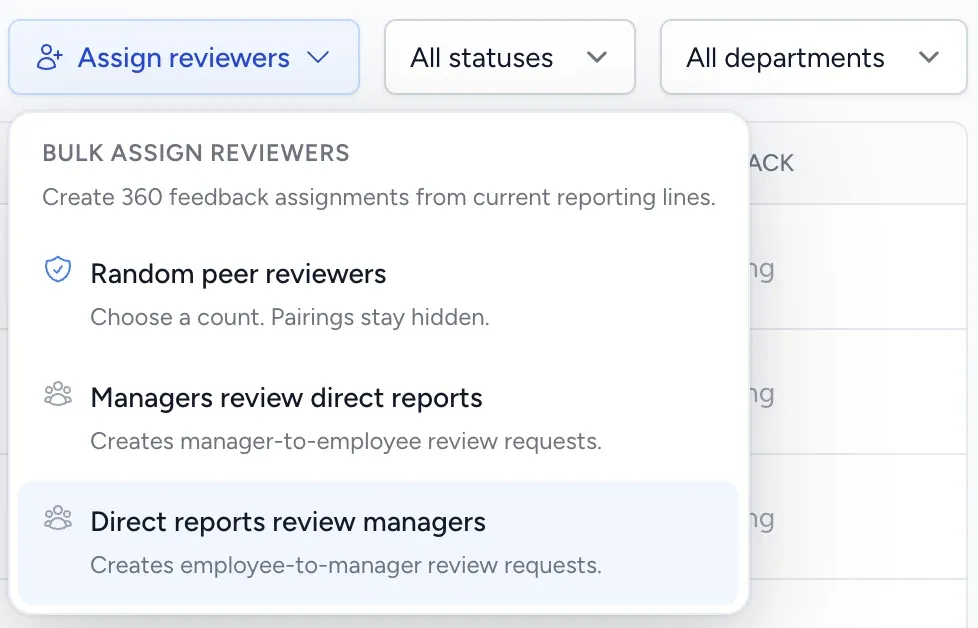
The button only appears when all three of these are true:
- You are an Administrator (Managers and Employees do not see it).
- Peer reviews are enabled for your workspace.
- The cycle status is Active and the cycle includes peer reviews.
What each bulk assignment option does
Section titled “What each bulk assignment option does”| Option | Who reviews whom | Typical use |
|---|---|---|
| Random peer reviewers | Randomly selected colleagues review each active employee | Broad 360 coverage without hand-picking peers |
| Managers review direct reports | Each manager reviews each of their active direct reports | Top-down manager feedback for the whole company |
| Direct reports review managers | Each active employee reviews their own manager | Upward feedback, so manager feedback is reciprocal |
All three read your current reporting lines at the moment you run them. Employees added or re-assigned to a different manager later are not picked up automatically, so run the action again if your org chart changes mid-cycle.
How the preview and confirmation flow works
Section titled “How the preview and confirmation flow works”Selecting an option does not create anything. FeedbackPulse first builds a preview and opens a dialog with these tabs:
| Tab | What it shows |
|---|---|
| Summary | How many assignments will be created and how many will be skipped |
| To notify | The reviewers who will receive a peer review request |
| Skipped | The employees who will not be changed, with a reason for each |
| Email preview | The exact request email the first reviewer will receive |
For Random peer reviewers, the dialog shows a Coverage preview instead of a reviewer list, plus a Reviewers per employee field. Pairings are never displayed, before or after creation.
Nothing is created until you select Create and notify reviewers (relationship options) or Assign random peers (random option). At that point FeedbackPulse creates the peer reviews and emails each reviewer a review request. Each new review is due on the cycle’s due date.
Rules and limits for bulk assignment
Section titled “Rules and limits for bulk assignment”- Only active employees are included. Deactivated employees are never assigned as reviewer or reviewee.
- Re-running is safe. Any reviewer-to-employee pair that already exists in the cycle is skipped as Already assigned, so you can run an action again after adding new hires.
- Your peer review questions must be set up. If the workspace has no active peer review questions, every assignment is skipped as No peer questions.
- Emails are queued, not instant. The confirmation reports assignments as created; the request emails send shortly afterwards through the mail queue.
- Assignments belong to one cycle. They do not carry over into the next review cycle.
Why employees get skipped
Section titled “Why employees get skipped”| Skip reason | What it means |
|---|---|
| Already assigned | That reviewer already has a review request for that employee in this cycle |
| Missing manager | The employee has no manager set on their profile |
| Inactive person | The employee’s manager is deactivated, or is the employee themselves |
| No direct reports | A person marked as a manager has no active direct reports (shown for Direct reports review managers) |
| No peer questions | The workspace has no active peer review questions |
| Under-covered | Too few eligible peers exist to reach the requested random reviewer count |
Fix skipped employees by setting the missing manager on the employee’s profile, reactivating the person, or lowering the reviewer count, then run the action again.
Random peer reviewer rules
Section titled “Random peer reviewer rules”Random peer reviewers asks for a Reviewers per employee count and then fills any gap for each employee.
- The minimum is 3 reviewers per employee.
- The maximum is 10, or the number of active employees minus one if your workspace is smaller than that.
- FeedbackPulse counts how many random reviewers each employee already has in the cycle and only creates the missing ones, so raising the count from 3 to 5 tops everyone up instead of duplicating.
- Reviewers are spread evenly, so the same colleagues are not loaded with every review.
- A person is never selected to review their own manager, their own direct reports, themselves, or anyone they are already reviewing in that cycle.
Random peer reviews are always anonymous. Relationship-based assignments (Managers review direct reports and Direct reports review managers) use your workspace default under Settings > Peer Reviews, which is anonymous unless an Administrator changes it.
Can direct reports submit feedback for their managers? Yes. Open the active review cycle, select Assign reviewers, and choose Direct reports review managers. This creates a review request for every active employee to review their own manager, which makes manager feedback reciprocal in the same cycle. Run Managers review direct reports as well if you want feedback flowing in both directions.
Does bulk assignment overwrite reviewers I assigned by hand? No. Existing peer reviews are never edited or removed. Pairs that already exist are reported as Already assigned and left alone.
Can Managers use the Assign reviewers bulk action? No. The three bulk assignment options are Administrator-only. Managers can still request peer reviews for their own reports individually.
Can I run bulk assignment before the cycle starts? No. The action is only available while the cycle status is Active. Draft and scheduled cycles do not accept peer review creation.
Will reviewers know the assignment was automatic? Reviewers receive the standard peer review request email. For random assignments, reviewer pairings stay hidden from everyone, including Administrators, before and after creation.
Where do I see the results? The peer review list on the cycle page updates immediately. See Peer Reviews for how responses are aggregated and Review Cycle Analytics for cycle-level reporting.