FeedbackPulse Peer Reviews
A Peer Review collects feedback from an Employee’s colleagues, providing a 360-degree view of their performance beyond the Manager’s perspective.
How Peer Reviews work
Section titled “How Peer Reviews work”- An Admin or Manager creates a Review Cycle with Peer Review enabled
- Peers are assigned to each Employee (3-5 peers recommended)
- Each Peer answers structured questions about the Employee
- Responses are aggregated according to the anonymity setting
- Results are shared with the Employee and/or Manager as an aggregated feedback report (see What the peer feedback report looks like)
Entity relationships
Section titled “Entity relationships”- A Peer Review is a component within a Review Cycle (it can be standalone or part of a Performance Review).
- Each Employee in the cycle is assigned one or more Peers.
- Each Peer completes one Peer Review per assigned Employee.
- Peer assignments are managed per Review Cycle. They do not carry over between cycles.
Peer selection methods
Section titled “Peer selection methods”| Method | How it works | Best for |
|---|---|---|
| Manager assigns | The Manager selects Peers for each of their direct reports | Ensuring relevant cross-functional feedback |
| Employee nominates | The Employee suggests Peers. The request becomes a live Peer Review as soon as it’s submitted; there is no manager approval step | Empowering Employees to choose their own reviewers |
| Automatic | Peers are selected at random from active employees across the company (excluding the reviewee, their manager, and their direct reports) | Quick setup with minimal manual work |
Administrators can apply any of these across a whole active cycle in one step. See Bulk Assign Reviewers.
What the peer feedback report looks like
Section titled “What the peer feedback report looks like”Once enough anonymous Peer Reviews are completed for an Employee, FeedbackPulse builds an aggregated peer feedback report. Named (non-anonymous) Peer Reviews are shown individually and are not folded into this aggregate. Open the report from the Employee’s profile (Peer Reviews tab, Open aggregated feedback) or from the Employee’s own Peer Reviews page.
The report appears after at least 2 anonymous Peer Reviews are completed for that Employee. Until then, the page shows how many more anonymous reviews are needed.
If the Employee’s questions are tagged with competencies (for example Communication, Focus, Collaboration, Leadership, Innovation), the report opens with a Competency summary card:
- Strongest signal (the competency with the highest average rating)
- Development area (the competency with the lowest average rating)
- Average across competencies (the overall average across all rated competencies)
- A row of badges showing every competency’s average score
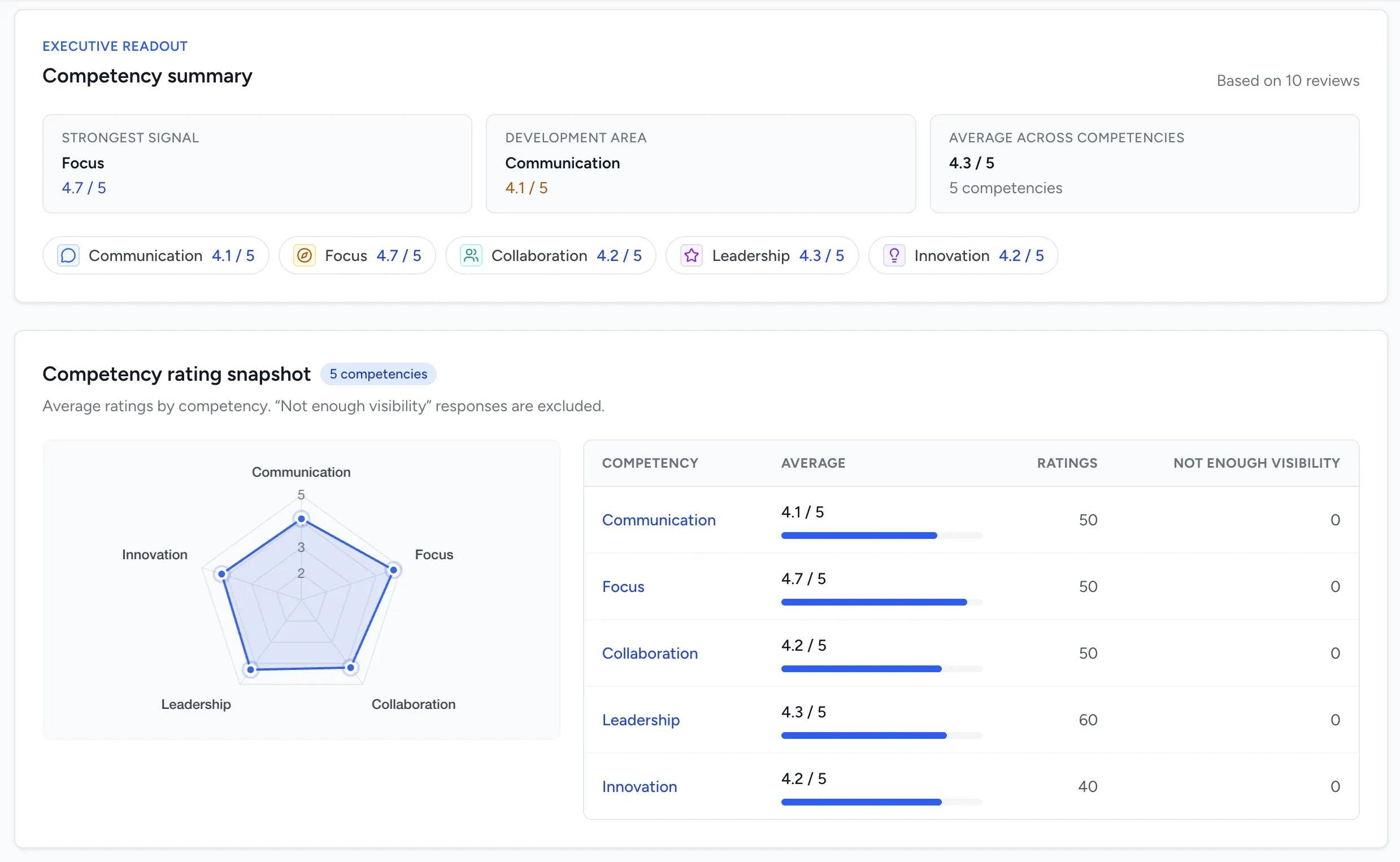
Below that, the Competency rating snapshot card shows a radar (spider) chart plotting each competency’s average rating, alongside a table with the average, number of ratings, and number of Not enough visibility responses per competency.
Not enough visibility is a response option Peers can choose instead of a numeric rating, for when they don’t have enough direct experience with that competency to rate it fairly. These responses are excluded from the competency averages and shown separately in the “Not enough visibility” count.
Anonymity
Section titled “Anonymity”Anonymity is set on each individual Peer Review request, not as a cycle-wide mode. Whoever sends the request (a Manager, an Admin, or the Employee through a nomination) marks that specific request as anonymous or named. Your organization can set a tenant-wide default for new requests under Settings > Peer Reviews (see Peer Review Settings), and that default can be overridden per request.
| Setting | Employee sees | Manager and Admin see |
|---|---|---|
| Anonymous | Aggregated feedback only, without attribution | Aggregated feedback only, without attribution |
| Named | Each Peer’s response attributed to them | Each Peer’s response attributed to them |
Rules and constraints
Section titled “Rules and constraints”- There is no fixed cap on the number of Peer Review questions. Keep the list short enough that Peers can complete it without review fatigue.
- Manual peer assignment requires at least 1 Peer per Employee. Automatic assignment requires at least 3 eligible Peers before it will assign anyone.
- A Peer cannot review themselves.
- An Employee’s direct Manager can never be selected as that Employee’s Peer reviewer, whether reviewers are chosen manually or assigned automatically. Use the Manager Evaluation in a Performance Review for manager-level feedback instead.
- Anonymous response text cannot be retroactively attributed to a specific Peer by anyone but the Peer themselves. Reviewer identity in Employee-profile and report views is only masked for automatically assigned anonymous reviews; manually requested anonymous reviews can still show the reviewer’s name in those views.
Frequently asked questions
Section titled “Frequently asked questions”Q: Can an Employee see which specific Peer wrote which comment? A: Only if that Peer Review was requested as Named. For Anonymous Peer Reviews, the Employee sees feedback only through the aggregated report, without attribution.
Q: What is the difference between a Peer Review and a Performance Review? A: A Performance Review collects Self-Assessments and Manager Evaluations. A Peer Review collects feedback from colleagues. Peer Reviews can run as standalone cycles or as a component within a Performance Review.
Q: Can Peers decline to participate? A: Peers cannot opt out of an assigned Peer Review. If a Peer does not complete their review by the deadline, their status shows as incomplete.
Q: Who can view the aggregated peer feedback report? A: The Employee it’s about, their Manager (or a Manager further up their reporting chain), and Admins. The report aggregates anonymous Peer Reviews; Named Peer Reviews are shown individually rather than folded into it.
Q: Why don’t I see a Competency summary or radar chart on the report? A: The Competency summary only appears when the review’s questions are tagged with competencies. The radar chart specifically needs at least 3 competencies with numeric ratings on the same scale; otherwise you’ll see the ratings table without a chart.