FeedbackPulse Performance Reviews
A performance review is one employee’s form inside a review cycle: that person’s self-review plus their manager’s review. It is not a type of cycle. A review cycle can include performance reviews, peer reviews, or both. Launching or scheduling a cycle does not create forms.
How Performance Reviews work
Section titled “How Performance Reviews work”Each performance review contains these components:
- A Self-Assessment (the Employee answers questions about their own performance)
- A Manager Evaluation (the Manager answers questions about the Employee’s performance)
Peer reviews are separate requests, not part of the performance review form. A review cycle can include them alongside performance reviews. See Peer Reviews.
Performance review questions come from a single, tenant-wide question list, configured once in Settings > Performance Reviews and reused by every review cycle. There is no per-cycle template. The current questions are snapshotted onto each new review when it is created. The manager on the form is the employee’s manager at creation; nobody picks a different reviewer. Each new review sends the same assignment email. Adding performance reviews does not create peer reviews or upward reviews.
Entity relationships
Section titled “Entity relationships”- A performance review belongs to one Organization.
- A performance review is one employee’s form inside a single review cycle.
- Each Participant completes one Self-Assessment per cycle.
- Each Participant’s Manager completes one Evaluation per cycle.
- Self-review and manager-review questions are shared across the whole Organization, not chosen per cycle.
How to customize review questions and rating language
Section titled “How to customize review questions and rating language”Admins can configure performance review questions before launching a cycle. Use Settings > Performance Reviews to manage manager-review questions and self-review questions.
| Need | What to use |
|---|---|
| Change the tone of a rating scale | Choose a different Rating Labels preset, such as Agreement or Frequency, instead of Performance |
| Avoid a long scale | Use a 3-point, 4-point, or 5-point scale where the selected preset supports it |
| Review company values or competencies | Add a Competency question and select the values or competencies to include |
| Ask for examples | Add an Open-ended Text question, or add a text competency question for the same values |
FeedbackPulse currently uses preset rating-label sets for performance review questions. For example, the Performance preset starts at “Needs Improvement”, while Agreement and Frequency use softer language for many culture and values questions.
If you want reviewers to rate a value and give examples, create two prompts: one rating competency prompt for the score and one open-text competency prompt for examples. This keeps the rating easy to compare and gives managers written context.
How to create a Performance Review
Section titled “How to create a Performance Review”- Go to Reviews > Cycles and choose New Cycle. (Settings > Review Cycles is configuration-only and does not create cycles.)
- Set the review period, cycle length, and due date. The due date must be at least seven days after the review period end date.
- Choose the peer reviewer selection mode and any other cycle settings.
- Choose the launch mode: Keep as Draft, Schedule Launch, or Launch Now.
- Once the cycle is active, add performance reviews from the active cycle page or the admin banner on Performance Reviews. The cycle header says Add performance reviews; the empty cycle table and the banner say Generate Reviews. Those are the same admin action.
Launching or scheduling a cycle does not create forms. Admins can add active employees who have an assigned manager and do not already have a review in that cycle. The preview shows who will receive a review, who already has one, and who is not eligible; if the selection includes someone who is no longer eligible, the whole request is rejected.
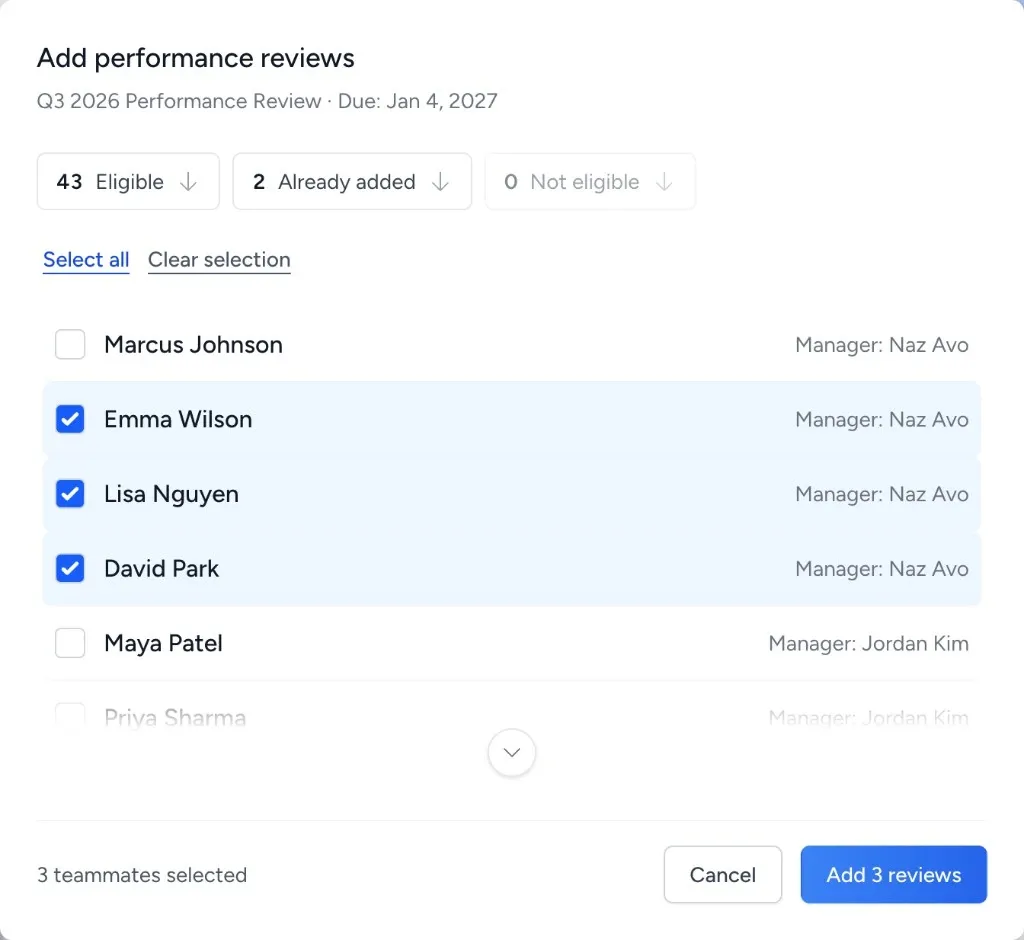
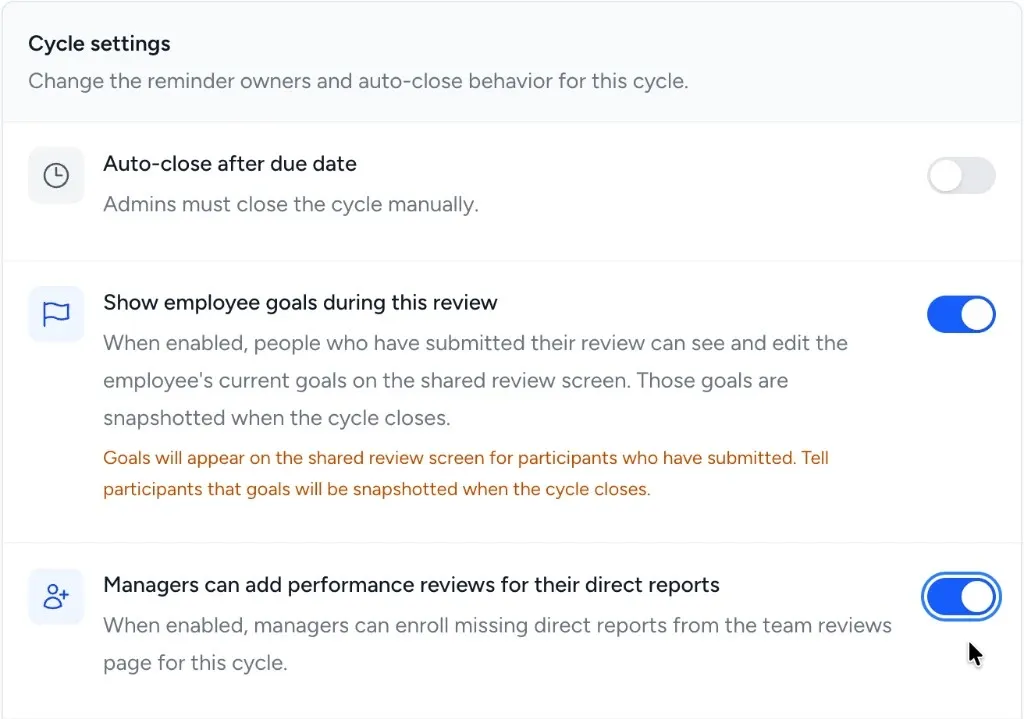
Managers can add performance reviews for their own direct reports when the cycle allows it. The control is on Reviews > Cycles for a cycle that includes performance reviews, labeled Managers can add performance reviews for their direct reports. It starts off, stays changeable while the cycle is still collecting reviews, and is not on Settings > Review Cycles. When it is on, managers use Performance Reviews > Team, choose Add performance reviews, and pick which of their own active direct reports are missing a review in that cycle. Turning the control off hides the action and leaves existing reviews in place. A duplicated cycle starts off.
Who sees what
Section titled “Who sees what”Creating a review is separate from viewing one.
| Viewer | Can create or add | Can view |
|---|---|---|
| Admin | Add performance reviews on an active cycle that includes performance reviews, for any active employee who has a manager and does not already have a review in that cycle. | All reviews across the organization. An admin fills in a form only when they are the employee or the assigned manager. |
| Manager | Add performance reviews for their own active direct reports who are missing a review in the viewed cycle, when the cycle allows it. Cannot create the cycle, edit questions, choose another reviewer, or have forms appear at launch. | Self-Assessments and Evaluations for their direct reports. A higher manager can read finalized reviews for indirect reports but cannot add those reviews or edit or submit the direct manager’s form. |
| Employee | Cannot add reviews. | Their own Self-Assessment. Their Manager’s Evaluation, once both the Self-Assessment and Manager Evaluation are submitted. |
Unsubmitted answers stay with the author until submit. The employee sees the manager review once both sides are submitted. There is no setting to hide it.
Rules and constraints
Section titled “Rules and constraints”- A performance review requires the reporting structure (Employee → manager) to be set up. Employees without an assigned manager cannot be added.
- One performance review per employee per cycle.
- More than one review cycle can be active at the same time. Each employee can have one performance review in each cycle. Completed cycles keep their reviews.
- The due date must be at least seven days after the review period end date.
- Settings > Review Cycles does not create cycles. Cycles are created at Reviews > Cycles > New Cycle, with Keep as Draft, Schedule Launch, or Launch Now.
- Historical Performance Review data is preserved indefinitely and visible in Analytics.
Frequently asked questions
Section titled “Frequently asked questions”Q: Can an Employee skip the Self-Assessment? A: Self-Assessments are expected from every Participant. Individual questions can be marked as required in Settings > Performance Reviews; check with your admin about which questions are mandatory in your organization.
Q: Can I run Performance Reviews on a custom schedule (not monthly/quarterly/annual)? A: Yes. When creating a Review Cycle, set any start date and deadline you choose. The cadence options (monthly, quarterly, annual) are defaults, and you can override them.
Q: What is the difference between a Performance Review and a Peer Review? A: A Performance Review collects Self-Assessments and Manager Evaluations. A Peer Review collects feedback from colleagues. A review cycle can include performance reviews, peer reviews, or both.