Survey Analysis Packs for AI Tools
A survey analysis pack is a ZIP export built for AI-assisted HR analysis. Use it when you want to give ChatGPT, Claude, Codex, Microsoft Copilot, or another AI tool the survey files it needs to chart eNPS by department, list the supporting numbers, summarize themes, and draft an executive memo.
When to use a survey analysis pack
Section titled “When to use a survey analysis pack”Use an analysis pack when you want to compare survey results across departments over time without manually exporting each survey.
The pack is scoped to one survey template and the time range selected in Reports > Surveys. It includes the per-department breakdown inside the ZIP, so department and employee-level page filters are not applied to the export.
Before you start
Section titled “Before you start”- You need permission to export survey reports.
- Choose the survey template you want to analyze.
- Choose the time range you want included: past 7 days, past 30 days, past 3 months, past 6 months, past 12 months, past 18 months, or past 24 months.
- At least one survey in the selected template and time range must have responses.
Download the analysis pack
Section titled “Download the analysis pack”- Go to Reports.
- Open Surveys.
- Choose the survey template.
- Choose the time range for the analysis.
- In Recent Survey Instances, click Export as analysis pack.
- Save the ZIP file.

What’s inside the ZIP
Section titled “What’s inside the ZIP”| File | Use it for |
|---|---|
ai_analysis_guide.md | A quick guide you can paste or reference when asking an AI tool to analyze the pack. |
manifest.json | Export metadata, selected template, time range, privacy threshold, and file list. |
survey_context.csv | Export type, template, time range, date range, included survey count, and the minimum response threshold used. |
included_surveys.csv | Survey periods, survey-level recipient counts, completed counts, and response rate. |
department_period_metrics.csv | Department-period completion counts and privacy status. |
department_enps_trends.csv | Graph-ready eNPS rows by department, survey period, and question. |
trend_data.json | JSON version of the department eNPS trend data. |
text_responses.csv | De-identified text responses when enough responses are available. |
questions.csv | Question wording and public question identifiers. |
ai-skills/hr-survey-analysis/ | Portable AI instructions and reference notes for HR survey analysis. |
scripts/analyze_department_trends.py | A small Python helper for deterministic eNPS trend summaries. |
Use the pack with ChatGPT, Claude, Codex, or Copilot
Section titled “Use the pack with ChatGPT, Claude, Codex, or Copilot”If your AI tool accepts ZIP uploads, upload the ZIP directly. If it does not, unzip the pack and upload the files listed above.
Start with this prompt:
Use the FeedbackPulse survey analysis pack I uploaded. Follow ai_analysis_guide.md and ai-skills/hr-survey-analysis/SKILL.md. Create a department eNPS trend chart over time, include supporting numbers for each department, then write an executive memo with recommended HR actions and caveats.If your AI tool supports code execution, ask it to run scripts/analyze_department_trends.py first. That script summarizes available eNPS rows by department with response counts, promoters, passives, detractors, and scores. Then ask the AI tool to use those numbers for the chart and memo.
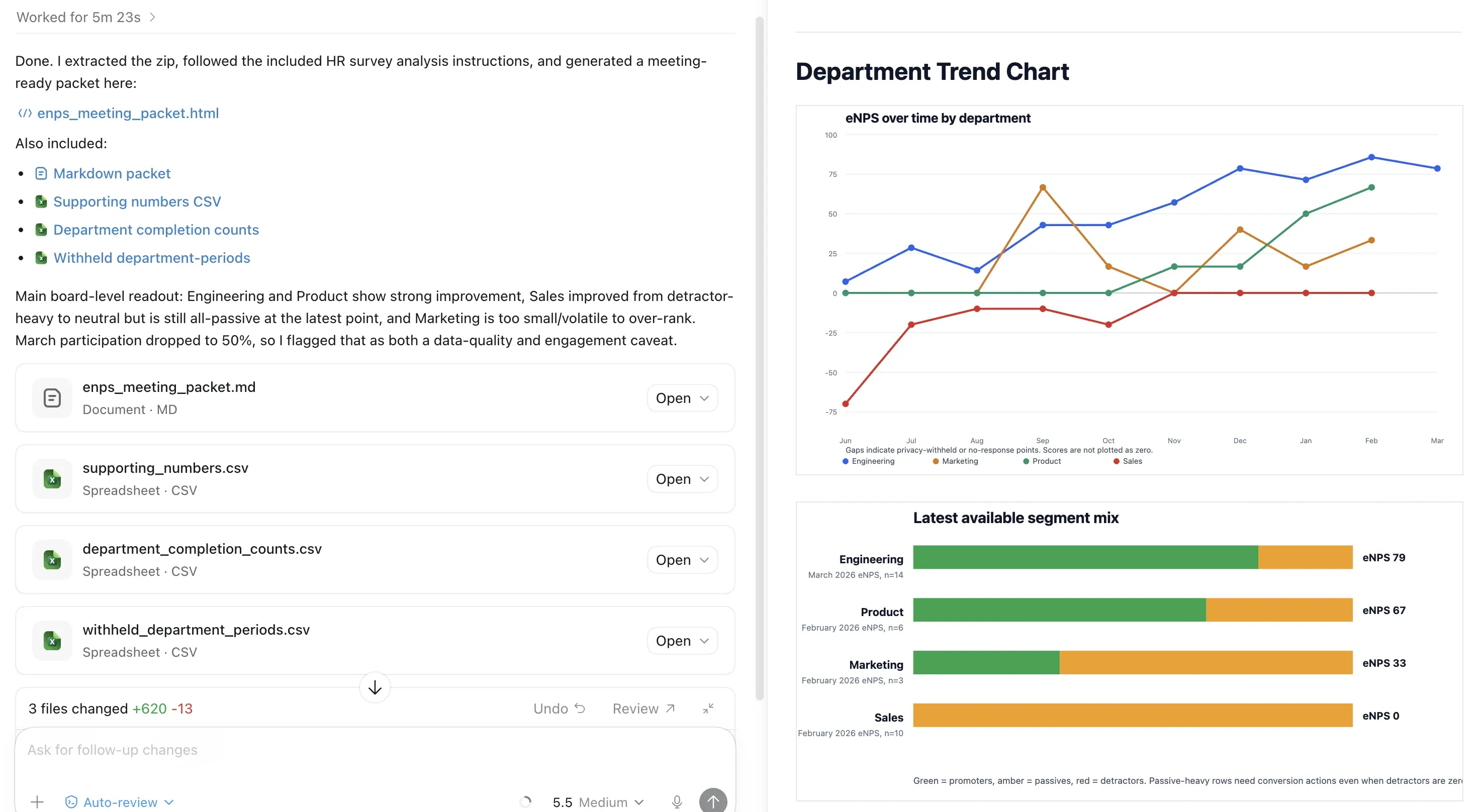
What to ask for
Section titled “What to ask for”| HR question | Useful prompt |
|---|---|
| Which departments are improving or declining? | ”Show eNPS over time by department and classify each department as improving, declining, stable, volatile, or insufficient data.” |
| What numbers support the graph? | ”For each latest department point, list response count, promoters, passives, detractors, passive rate, and score.” |
| What should leadership know? | ”Write a 3-paragraph executive memo that separates data-backed findings from caveats.” |
| What should HR do next? | ”Recommend 3 to 5 actions tied to specific departments, trends, or recurring text themes.” |
How privacy protections appear
Section titled “How privacy protections appear”Analysis packs keep department trends useful while protecting anonymity.
- Rows with
privacy_status=privacy_withheldhave sensitive counts and scores blanked. - Treat withheld values as missing data, not as zero.
- Do not ask the AI tool to infer hidden values.
- Text responses do not include employee names, emails, user IDs, recipient IDs, or per-response timestamps.
- Department-level response rate is not included. Use department completion counts and survey-level response rate instead.
Interpreting the output
Section titled “Interpreting the output”Use the AI output as a first analysis pass, then validate the chart and memo before sharing. Check that the tool did not plot withheld or no-response values as zero, did not rank departments with very small sample sizes too strongly, and did not turn survey signals into causal claims.
For exact FeedbackPulse benchmark context, use the benchmark view in FeedbackPulse. The bundled HR reference files provide conservative interpretation heuristics, not official benchmark scores for your company size or industry.