


Free Chrome extension
Rewrite survey feedback in a neutral voice.
Pulse Feedback Survey Anonymizer rewrites your answer and flags details that could identify you. You decide what goes back into the form.
10 free rewrites a week · No account needed
Try it with a sample answer
Sample employee survey

What should we know about your role?
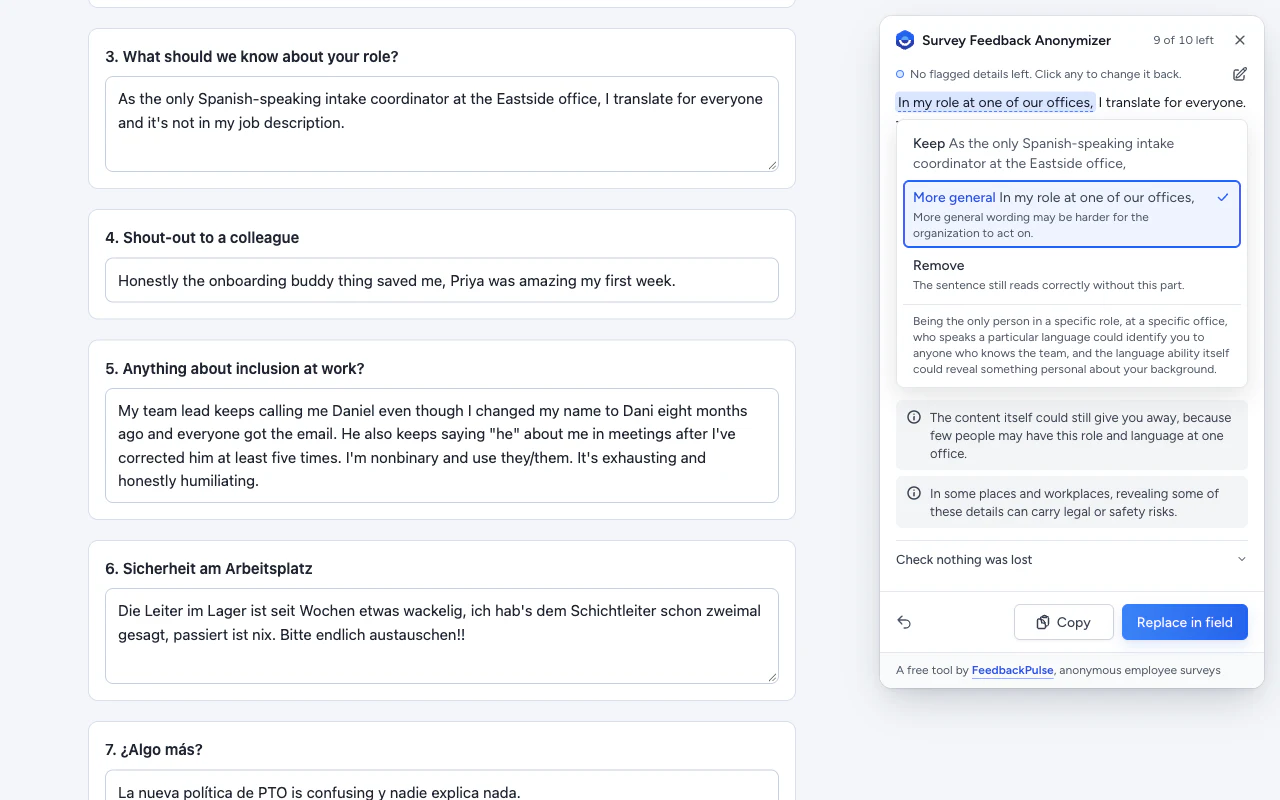
As the only Spanish-speaking intake coordinator at the Eastside office, I translate for everyone and it’s not in my job description.
Neutral rewrite
1 detail to review
Replaced in the sample
In my role at one of our offices, I translate for everyone. This is not part of my job description.
The original names a role and location that could identify the writer.
This demo uses a saved example and sends no survey text.
How the survey feedback anonymizer works
AI suggests a plain, neutral rewrite in the language you wrote in, even if you mix languages. It helps you make your writing harder to recognize before you submit your feedback.
-
Start from your answer
Click into your answer or select text, then use the toolbar icon or right-click and choose Anonymize this feedback.
-
Review the flagged details
Check the neutral rewrite for changes to your wording. When the extension flags a name, date, location, or role, you can keep it, make it less specific, or remove it.
-
Put the rewrite back
Choose Replace in field or copy the rewrite. Submit the survey when you’re ready.
Want the button inside the answer box? Turn it on for a survey site you use. Chrome asks you to approve access for each site, and you can revoke it any time.
What happens to your survey text?
When you start a rewrite, a large language model provider processes the text you choose. Under the provider’s commercial data terms, your survey text isn’t used to train AI models.
Read the extension’s privacy policyQuestions about survey anonymity
Are anonymous employee surveys really anonymous?
It depends on how the survey is set up. Some survey tools can link a response to a sign-in or an individual invite link. Submission timing can also give the survey owner a clue. The extension helps reduce clues in the words you submit. Survey settings still determine what the survey collects.
Can my employer tell who wrote an anonymous survey comment?
Someone who knows your team may recognize a phrase you often use or an incident only a few people saw. Before submitting, check whether each detail helps explain the problem. For example, “at one of our offices” may be enough if the specific office is unrelated to the issue.
Will an AI rewrite soften my feedback?
The rewrite is designed to replace recognizable phrasing, such as slang or favorite expressions, while keeping your point and its urgency. Review the suggestion before you replace the original answer.
Does the extension read everything I type?
When you start a rewrite, the extension reads the field you’re using or the text you selected. If you enable the optional Anonymize button for a site, Chrome lets the extension count words in the active answer box locally. Your text is sent only when you start a rewrite.
How much does it cost?
You get 10 free rewrites each week, up to 500 words per rewrite. You don’t need a FeedbackPulse account.
Can I write in my own language?
Yes. The extension rewrites your answer in the language you wrote it in, including when your answer mixes languages.
Add the anonymizer to Chrome
Keep it handy for the next survey you’re asked to fill out.
 Add to Chrome