How FeedbackPulse Protects Anonymous Survey Answers
In an anonymous survey, nobody sees who gave which answer, including admins and the person who created the survey. Reports show grouped results, and each result only appears once enough people are in the group to keep any one person from standing out.
| What you see | When it appears in an anonymous survey |
|---|---|
| Names | Never |
| Scores (ratings, eNPS, yes/no) | Once at least 3 people in the group answered that question |
| Written answers | Once at least 5 people in the group completed the survey, for the whole survey or a single department |
| Submission times for written answers | Never |
Who could have written this comment?
Section titled “Who could have written this comment?”Move the numbers and switch views to see what an admin’s report shows. Each shown comment could have come from anyone in the highlighted group.
Report view: Sales
9 peopleScores
ShownRatings, eNPS and yes/no questions. Each score needs at least 3 answers. This group has 9.
Written answers
HiddenWritten answers are unavailable for this reporting group.
Why: Showing this department would let someone compare comment lists and read what a team of 2 wrote. Hiding it keeps the leftover comments mixed with more people. Its comments still appear in the whole-survey view.
Example: Engineering 18, Sales 9 and Operations 2 people completed an anonymous survey. Viewing Sales: its comments stay hidden so the 2 people in Operations can’t be singled out.
Sales, 9 people: scores shown, written answers hidden.
I’m taking a survey: who can see what I write?
Section titled “I’m taking a survey: who can see what I write?”If the survey says Your responses stay anonymous, your name is never shown next to your answers. Reports show grouped results without displaying your name.
- Your scores are combined with everyone else’s in your group. A score only appears once at least 3 people answered.
- Your written answers are shown word for word, without your name or the time you sent them, in a shuffled order. They are not linked to your scores or your details.
- Your written answers only appear once at least 5 people in your group finished the survey, however many of them wrote a comment. Anyone who finished could have written yours.
- If you don’t finish, your written answers are left out.
Written answers can appear while the survey is still open, as your group responds. They never carry a name or a time, so the order you answered in is not visible.
Can a tool help my comment not sound like me?
Section titled “Can a tool help my comment not sound like me?”Yes. The free Pulse Feedback Survey Anonymizer Chrome extension from FeedbackPulse rewrites your answer in a plain, neutral voice and flags details that could still identify you, such as names, your role or dates. It works in any survey or feedback form.
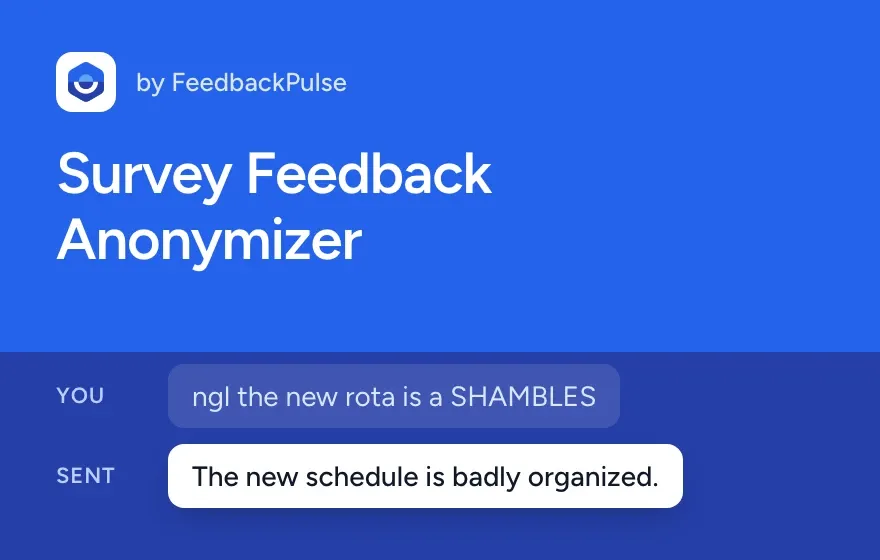
It lowers the chance that your writing gives you away, but it can’t guarantee anonymity. The AI rewrite runs on FeedbackPulse’s server, which doesn’t store your text.
I’m an admin: what will I see?
Section titled “I’m an admin: what will I see?”You see scores and written answers for groups large enough to protect the people in them. Everything else shows a short message explaining why it is hidden.
Which views show written answers?
Section titled “Which views show written answers?”| View in the report | Scores | Written answers |
|---|---|---|
| Whole survey | Yes, from 3 answers | Yes, from 5 people who completed |
| A single department | Yes, from 3 answers | Yes, from 5 people who completed, unless it would expose a smaller team |
| Level, manager team, location, tenure or other groups | Yes, from 3 answers | No, scores only |
Written answers are limited to the whole survey and single departments because comments are shown word for word. If two different filters each showed their comments, someone could compare the lists and narrow a comment down to one person.
What do the hidden-answer messages mean?
Section titled “What do the hidden-answer messages mean?”| Message you see | What it means |
|---|---|
| “Written answers appear once at least 5 people in this group have completed the survey, however many of them wrote one.” | Fewer than 5 people in this group have finished. The answers appear as more people complete. |
| “Written answers are unavailable for this reporting group.” | This filter shows scores only, or showing this department would expose a smaller team. |
For small filtered groups, the response count is hidden too when the group has fewer than 3 people.
Why can a large department be hidden?
Section titled “Why can a large department be hidden?”A department with 5 or more people can still be hidden when the departments that stay hidden would add up to only 1 to 4 people.
Take a survey where 18 people in Engineering, 9 in Sales and 2 in Operations completed it:
| View | Written answers |
|---|---|
| Whole survey | Shown: any of 29 people |
| Engineering | Shown: any of 18 people |
| Sales | Hidden |
| Operations | Hidden: fewer than 5 people |
If Sales were shown, anyone could take the whole-survey comments, remove the ones from Engineering and Sales, and read what the 2 people in Operations wrote. Hiding Sales as well means the comments left over could have come from any of 11 people. People with no department on record count as their own group.
When two departments are the same size, the one that comes first alphabetically is hidden. Hiding one is enough, so the other stays visible. Comments from hidden departments still appear in the whole-survey view, mixed in with everyone else’s.
Where do these rules apply?
Section titled “Where do these rules apply?”The same protections apply everywhere anonymous results appear:
- The survey report and filtered views
- Shared report links and leadership reports
- CSV exports, which leave out names, departments and response times for anonymous surveys
- AI survey summaries and comment topics. A saved AI summary stays hidden while the survey’s written answers are withheld.
- AI assistants connected through Claude and MCP
How are named surveys different?
Section titled “How are named surveys different?”Named surveys are not anonymous. Admins see each person’s name next to their answers, and there are no group minimums for scores or written answers. Choose Named only when respondents know their answers will be attributed to them.
An anonymous survey needs at least 3 recipients before you can launch it. See Launch Your First FeedbackPulse Survey.
Frequently asked questions
Section titled “Frequently asked questions”Can I lower the minimum for a small team?
Section titled “Can I lower the minimum for a small team?”No, the minimums are fixed. For a team of 4, you will see scores but not written answers. If you need comments from a very small group, run a named survey and tell people their answers carry their name.